DETECTION & RESPONSE

Speed Up
Incident Investigations

Accelerate detection and response times with GreyNoise threat context

Overview

GreyNoise accelerates investigations by adding context on IPs and CVEs seen in mass scanning and exploitation campaigns. This enrichment speeds triage, reduces manual work, and helps SOC teams more effectively investigate timelines and the scope of incidents.
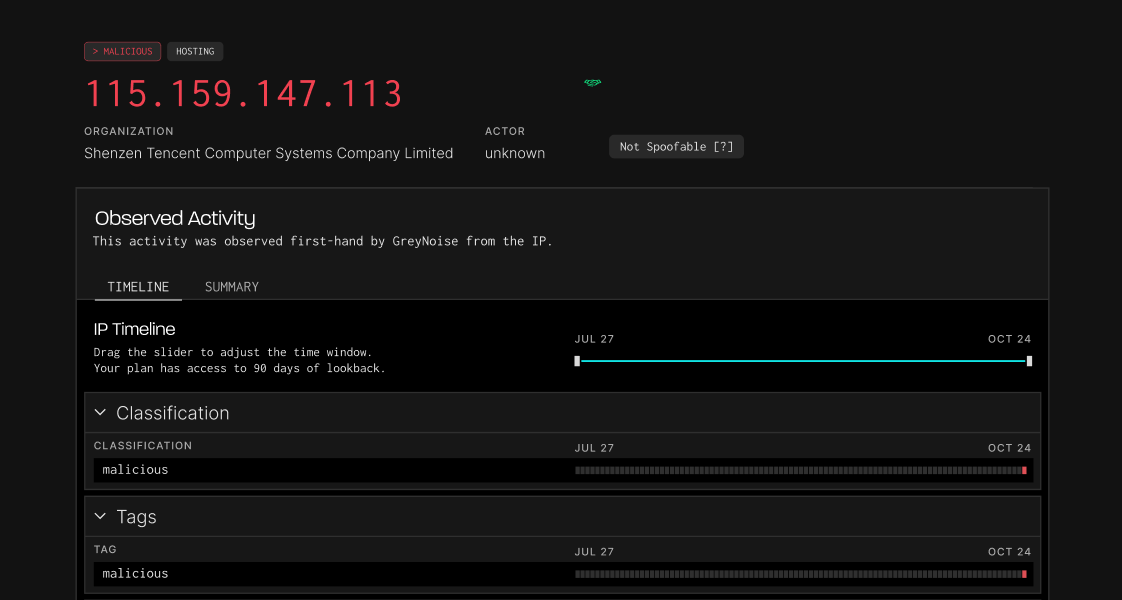
How GreyNoise Speeds Up Investigations

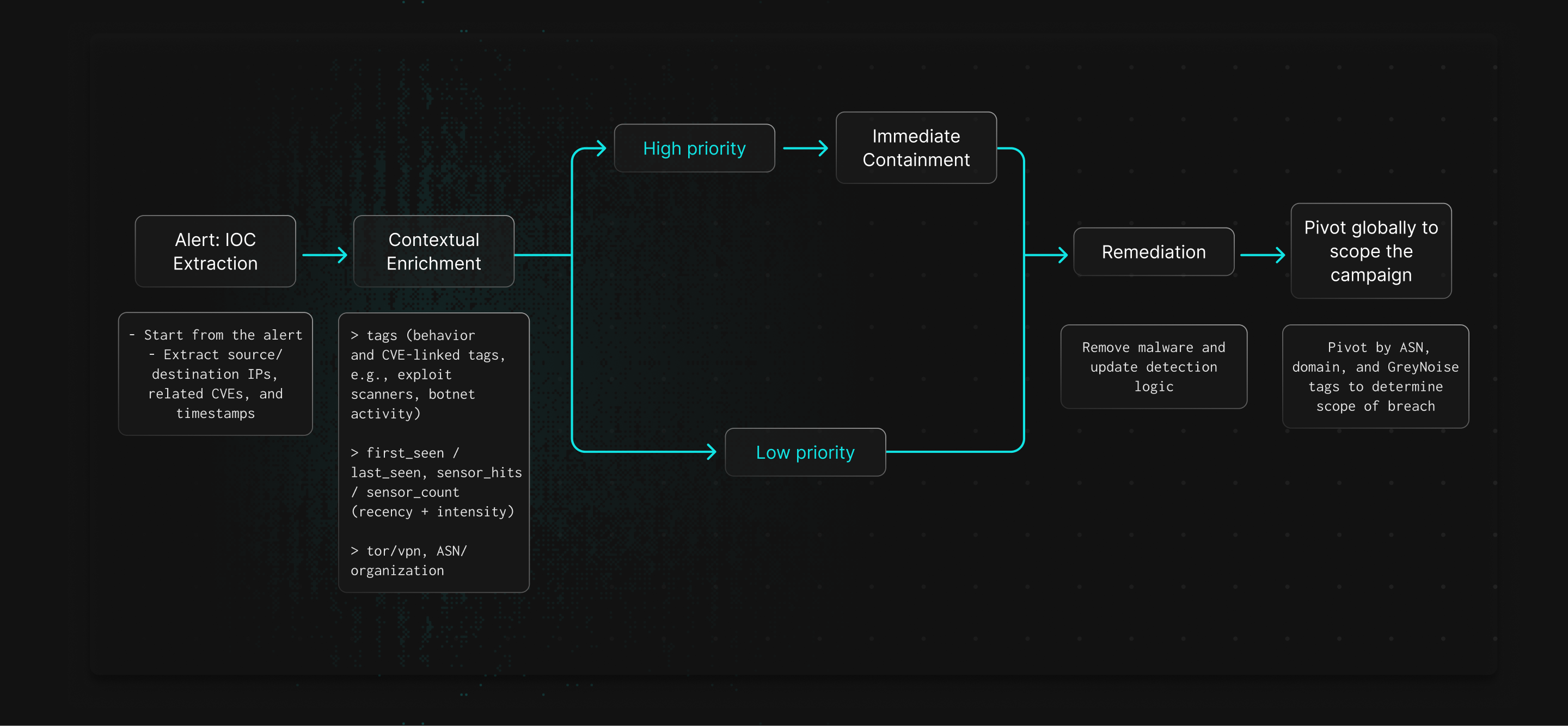
Enriched Threat Context

GreyNoise shows whether an IP is scanning broadly or targeting specific systems, helping analysts gauge threat levels.

Identify Exploitation Attempts

CVE tags reveal which vulnerabilities are being exploited and which assets are likely targeted.

Map Attack Infrastructure

GreyNoise links IPs, ASNs, and behaviors so analysts can pivot and see the broader campaign.

Strengthen Containment Decisions

Intelligence on attacker infrastructure helps teams decide when to block, monitor, or expand containment.

Speed Up Timeline Construction

Data on first seen, last seen, and behavior give provides evidence for accurate incident timelines.

Better Documentation and Reporting

Enriched incident reports clarify what happened and why it matters.

How it Works
Explore Available Fields

Filter by category & search available IP fields and their uses with GreyNoise.
Categories
Thank you! Your submission has been received!
Oops! Something went wrong while submitting the form.
NAME
Description & Use
Last Seen
Last date the IP was observed by GreyNoise sensors. Indicates recency of activity.
Activity Timeline
Last Seen Timestamp
Exact date and time the IP was last observed. Enables timeline reconstruction in investigations.
Activity Timeline
Mobile
Indicates if the IP belongs to a mobile/cellular network.
IP Address Metadata
Name
Display name of the tag. Analyst-facing label for quick recognition.
Tag Information
Organization
Organization responsible for the IP. Adds enrichment for attribution.
IP Address Metadata
Organization Count
Count of IPs linked to each organization. Useful for assessing exposure by provider.
Stats & Aggregates
Port
Port observed in scanning activity. Useful for identifying targeted services.
Observed Request Data
Protocol
Protocol (e.g., TCP/UDP) used in scanning activity. Adds layer-4 context.
Observed Request Data
RDNS
Reverse DNS value for the IP. May reveal hostnames tied to services or campaigns.
IP Address Metadata
RDNS Parent
Parent domain of the reverse DNS. Useful for clustering infrastructure.
IP Address Metadata
Recommended Block
Indicates whether IPs with this tag should be blocked. Supports automated policy decisions.
Tag Information
References
References (e.g., CVE pages, docs) supporting the tag. Provides analyst enrichment sources.
Tag Information
Region
State/province where the IP is registered. Adds sub-country geolocation context.
IP Address Metadata
Sensor Count
Number of distinct sensors that saw the IP. Higher values indicates wider scanning footprint.
Sensor Metadata
Sensor Hits
Total number of events GreyNoise sensors recorded from this IP. Indicates activity volume.
Sensor Metadata
Single Destination
True if the IP only scanned one country. Suggests targeted reconnaissance.
IP Address Metadata
Slug
Short identifier for the tag. Useful in queries and API lookups.
Tag Information
Source Bytes
Number of bytes sent from source IP. Useful for traffic analysis.
Observed Request Data
Source Country
Country where the IP is registered. Provides attacker infrastructure location context.
IP Address Metadata
Source Country Code
ISO country code for the IP’s registration country.
IP Address Metadata
Source Country Count
Count of IPs originating from each country. Useful for geo-distribution of attacks.
Stats & Aggregates
Source Latitude
Latitude of IP’s registered location. Useful for geo-mapping.
IP Address Metadata
Source Longitude
Longitude of IP’s registered location. Useful for geo-mapping.
IP Address Metadata
Spoofable
Shows whether the IP completed a valid TCP handshake. If false, traffic may be spoofed or fake.
Classification
Spoofable Count
Count of spoofable vs. non-spoofable IPs. Highlights volume of potentially fake traffic.
Stats & Aggregates
Tags Count
Count of IPs associated with specific tags. Helps identify common behaviors at scale.
Stats & Aggregates
Timeline
Key timeline details about when the CVE was published, updated, and added to CISA (https://www.cisa.gov/known-exploited-vulnerabilities-catalog). Useful for understanding how long the issue has been known.
Timeline & Lifecycle
Timeline CISA KEV Date Added
Date the vulnerability was added to CISA’s Known Exploited Vulnerabilities (KEV) catalog. Vulnerabilities in KEV should be prioritized for remediation per federal guidance.
Timeline & Lifecycle
Timeline CVE Last Updated Date
The last date the CVE entry was updated in the database. Useful for tracking changes in severity, affected products, or exploit status.
Timeline & Lifecycle
Timeline CVE Published Date
The date the CVE was first published. Helps determine how long attackers have potentially been aware of the vulnerability.
Timeline & Lifecycle
Timeline First Known Published Date
Date when the first exploit associated with the CVE was published.
Timeline & Lifecycle
Tor
Identifies if the IP is a Tor exit node. Tor traffic often indicates obfuscation or anonymization.
IP Address Metadata

Cut the Noise. Close the Case.