Product

Product announcements, new feature launches, and roadmap updates — everything you need to stay current on evolving GreyNoise solutions.

New GreyNoise Integrations Enhance Detection and Response Capabilities in Google SecOps

GreyNoise is launching a new SIEM and SOAR integration — with improved dashboards, detection rules, playbooks, and webhook support

Your SIEM ingests everything. Every port scan, every crawl, every opportunistic spray across the internet. The problem isn't the collection — it's context. Which of those IPs are scanning everyone, and which ones are targeting you?

That's the question GreyNoise answers. We observe over over 800,000 unique IPs daily across 5,000+ sensors in 80+ countries, classifying each as malicious, suspicious, benign, or unknown, and tagging them with 3,000+ behavioral descriptors. Traditional threat feeds add more indicators to investigate. GreyNoise removes the ones that don't matter.

Today, as a Google Integration partner, we're announcing a new and improved integration with Google SecOps that spans both SIEM and SOAR — delivering standardized indicator ingestion, pre-built dashboards, YARA-L detection rules, saved searches, SOAR response actions, webhook support, and ready-to-deploy playbooks.

What's New: SIEM

New Ingestion Script

The GreyNoise ingestion script now lives in Google's official Chronicle ingestion-scripts repository — a standardized process for importing threat intelligence indicators into your environment. Deployed as a Google Cloud Function, it pulls IP reputation data and GNQL query results from the GreyNoise API and ingests them via the Chronicle Ingestion API. The default configuration focuses on malicious IPs observed in the last 24 hours, but teams can customize the GNQL query to match their threat profile.

New Dashboards

Two interactive dashboards ship with the integration, ready to import into Google SecOps:

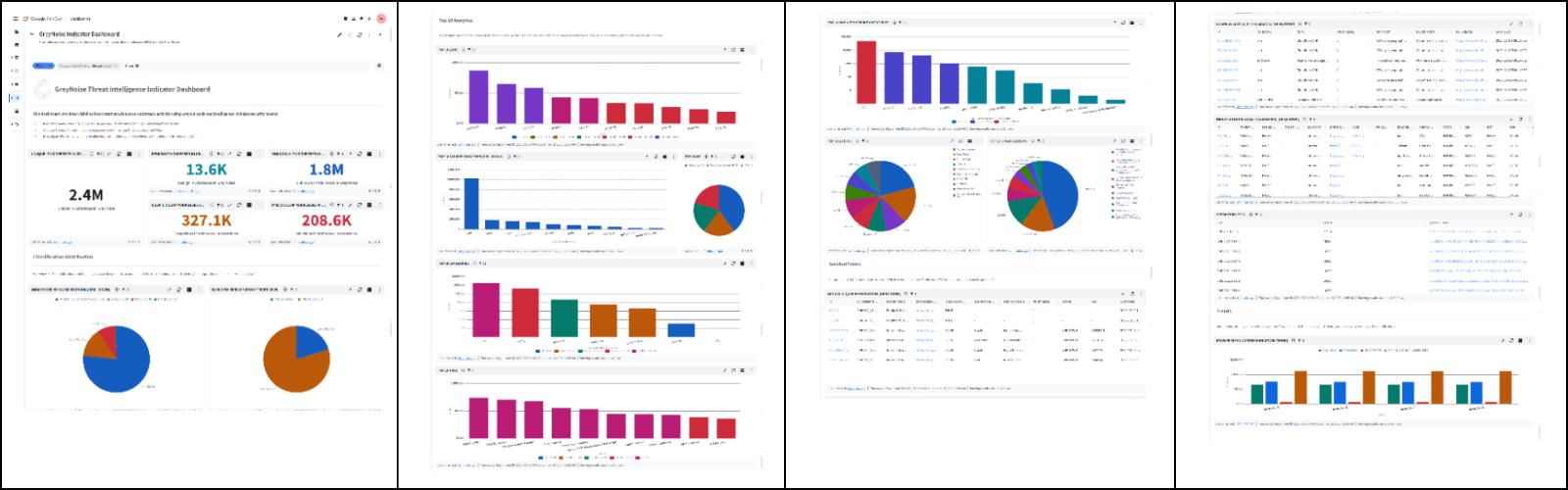
Indicator Dashboard — 15+ visualization panels covering classification distribution (Malicious, Suspicious, Benign, Unknown), top 10 rankings for organizations, actors, tags, ASNs, categories, operating systems, and source countries, plus CVE distribution, trend analysis, and business service intelligence.

GreyNoise Indicator Dashboard in Google SecOps

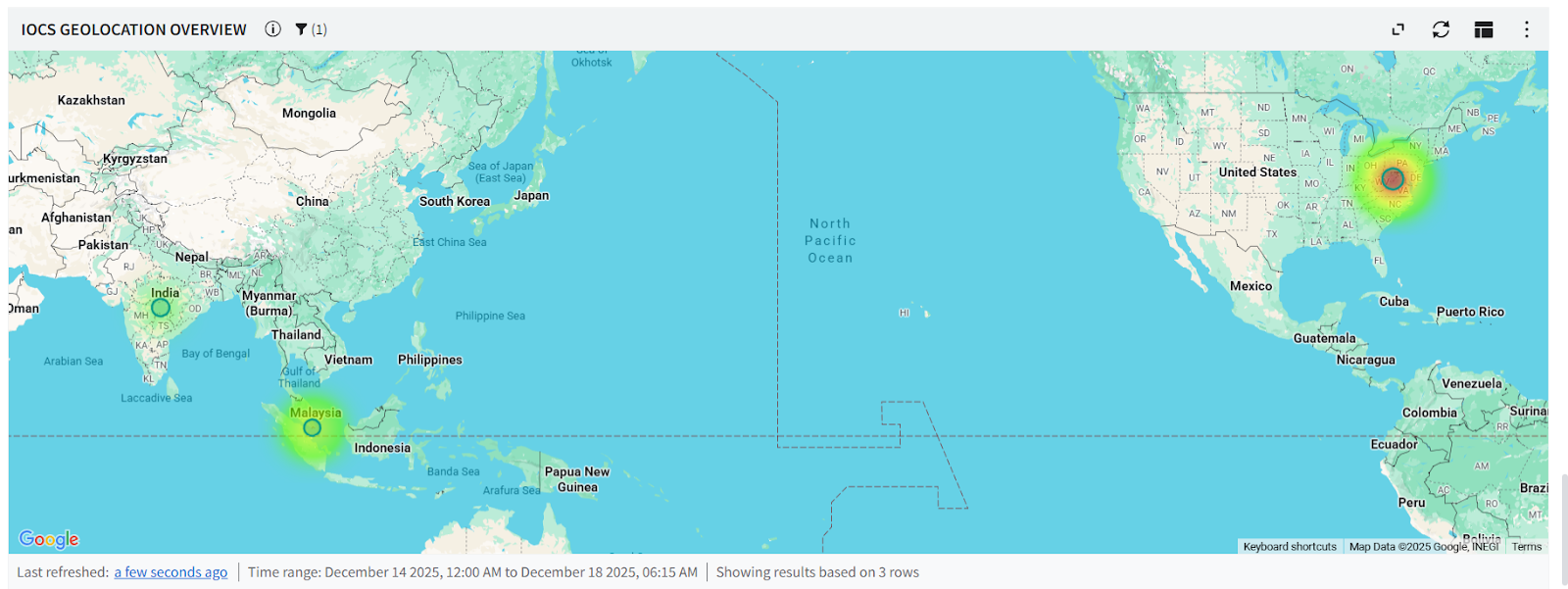
Correlation Dashboard — Shows IOC matches between GreyNoise intelligence and events from your environment, with geolocation mapping, event match trends, classification breakdowns, and top IP indicator rankings.

GreyNoise Correlation Dashboard in Google SecOps

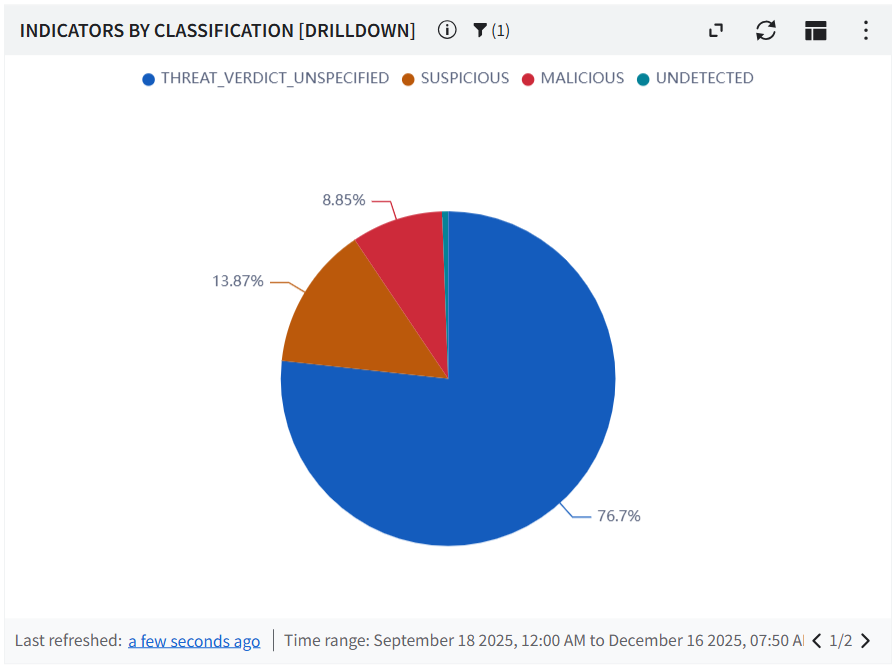
Indicators broken down by classification

New YARA-L Detection Rules

Three ready-to-deploy rules that start correlating immediately:

  • IP Match — Detects events where a source or principal IP matches a malicious or suspicious GreyNoise indicator, correlating over a 1-hour window.
  • Inbound Network Traffic with ASN Context — High-severity rule monitoring firewall logs for permitted inbound connections from GreyNoise-flagged malicious IPs, enriched with ASN attribution.
  • Brute Force Attack Detection — High-severity rule flagging 5+ blocked login attempts from GreyNoise-flagged IPs within a 15-minute window.

New Saved Searches

Four pre-built UDM queries for investigation workflows:

  • IP Risk & Vulnerability Details — Classification, anonymization signals, CVEs, and activity timelines
  • Indicator Context Summary — Actor attribution, geographic details, organizations, and tags
  • High Risk Indicators — Filters for MALICIOUS or SUSPICIOUS classifications only
  • All Indicator Lookup — Browse all ingested GreyNoise indicators for ad-hoc investigation

IOC Geolocation Overview — mapping matched indicators globally

What's New: SOAR

Updated Response Actions (v7.0)

The GreyNoise SOAR response integration has been updated to version 7.0 with the full suite of actions:

Action What It Does
IP Lookup Full enrichment — classification, tags, metadata
Quick IP Lookup Fast context check on any IP
IP Timeline Lookup Historical view of scanning behavior over time
Execute GNQL Query Run arbitrary GreyNoise queries within a playbook
Get CVE Details Vulnerability context from exploitation activity
Ping Validate API connectivity

New Webhook Support

A major addition: webhook support for ingesting GreyNoise alerts and event feeds directly into Google SecOps SOAR. Three webhook types are now available:

  • Alert Webhook — Ingests IP, CVE, TAG, and GNQL Query alerts
  • IP Change Webhook — Tracks classification changes in real time
  • CVE/Tag Webhook — Monitors CVE spikes, status changes, vendor activity, and tag spikes

New SOAR Playbooks

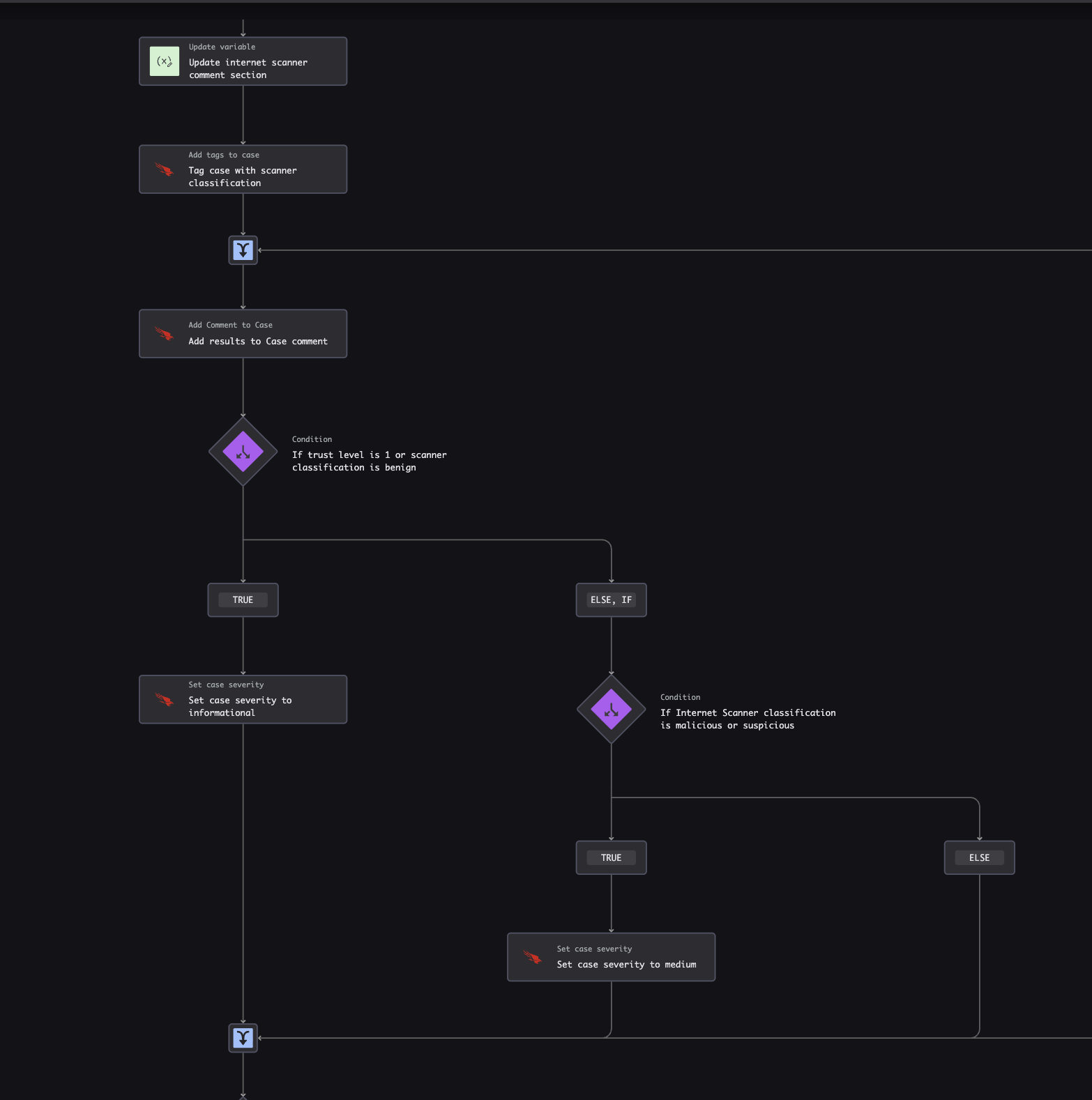
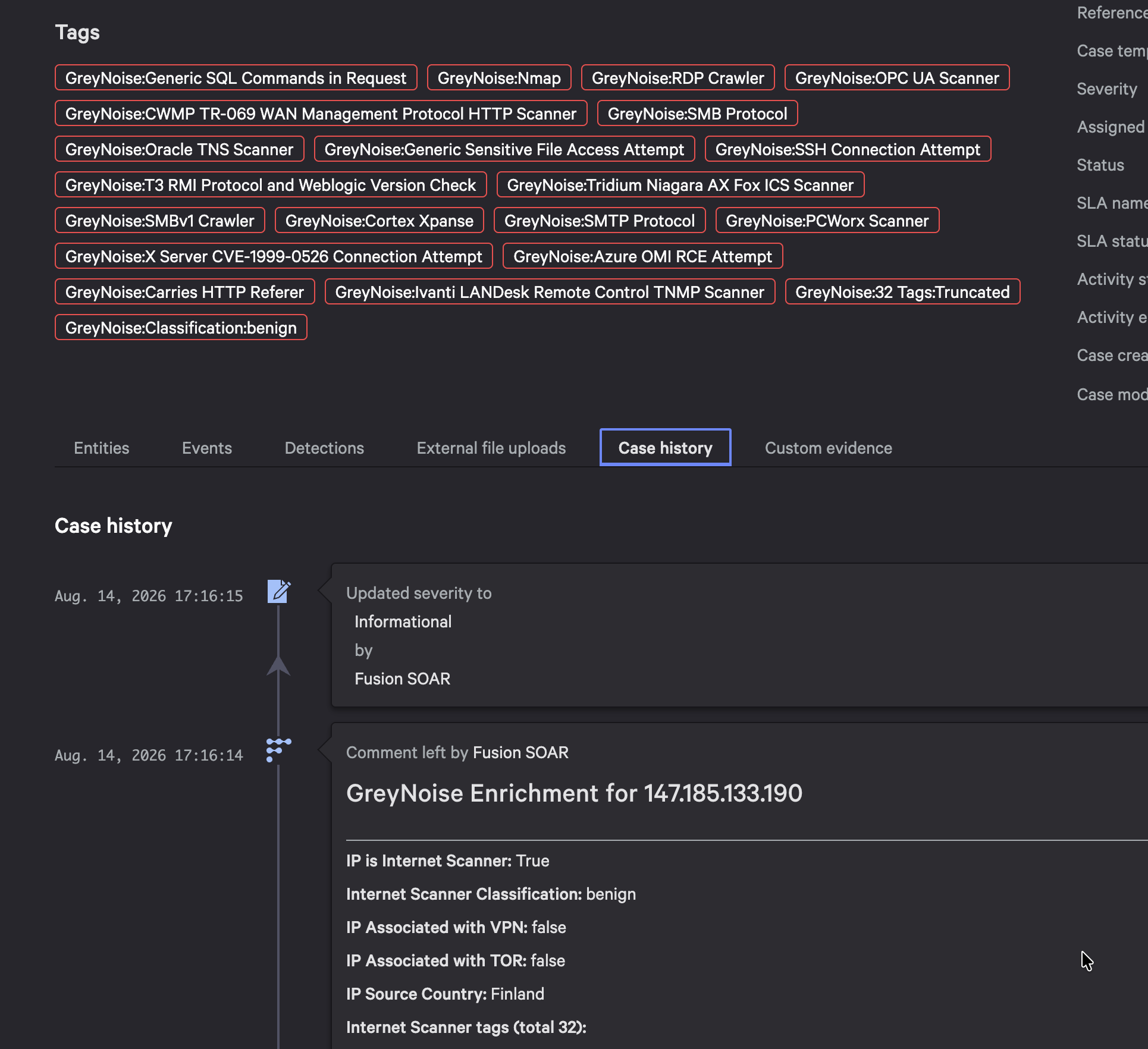
Pre-built playbooks ship with the integration, providing ready-made automation workflows that teams can deploy or customize. Combined with the webhook connectors and the Generate Alert from GreyNoise GNQL connector, security teams can build end-to-end automated triage pipelines.

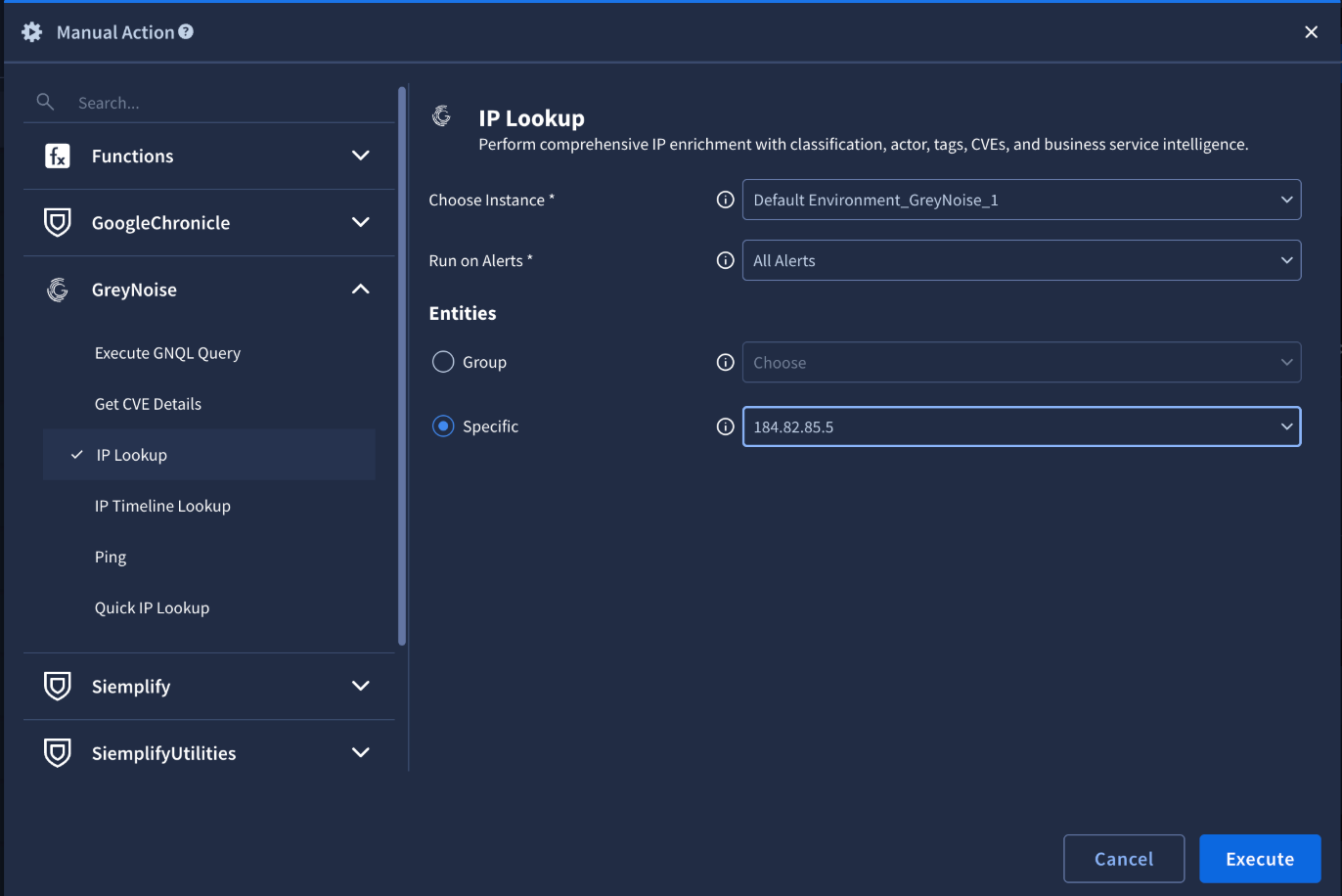
On-demand IP Lookup 

How It Works Together

The SIEM and SOAR components work as a unified pipeline:

  • 1. Ingest — The SIEM integration continuously pulls GreyNoise indicators into Google SecOps with fresh scanner data.
  • 2. Detect — YARA-L detection rules flag events that correlate with known scanners. Dashboards provide visual context.
  • 3. Investigate — Saved searches surface IP risk details, actor attribution, and CVE context without writing queries.
  • 4. Respond — SOAR playbooks enrich flagged IPs automatically. Mass scanners get deprioritized. Targeted activity escalates for review.

Webhooks close the loop by pushing GreyNoise alerts — including classification changes and CVE spikes — directly into SOAR for immediate action.

Who Has Access

This integration is available to any joint Google SecOps customer with a GreyNoise API key. No additional licensing required — just configure and go.

Learn More and Get Started

Ready to bring GreyNoise intelligence into your Google SecOps environment? Learn more here:

Thank you! Your submission has been received!
Oops! Something went wrong while submitting the form.

New GreyNoise Integrations Enhance Detection and Response Capabilities in Google SecOps

GreyNoise is launching a new SIEM and SOAR integration — with improved dashboards, detection rules, playbooks, and webhook support

Your SIEM ingests everything. Every port scan, every crawl, every opportunistic spray across the internet. The problem isn't the collection — it's context. Which of those IPs are scanning everyone, and which ones are targeting you?

That's the question GreyNoise answers. We observe over over 800,000 unique IPs daily across 5,000+ sensors in 80+ countries, classifying each as malicious, suspicious, benign, or unknown, and tagging them with 3,000+ behavioral descriptors. Traditional threat feeds add more indicators to investigate. GreyNoise removes the ones that don't matter.

Today, as a Google Integration partner, we're announcing a new and improved integration with Google SecOps that spans both SIEM and SOAR — delivering standardized indicator ingestion, pre-built dashboards, YARA-L detection rules, saved searches, SOAR response actions, webhook support, and ready-to-deploy playbooks.

What's New: SIEM

New Ingestion Script

The GreyNoise ingestion script now lives in Google's official Chronicle ingestion-scripts repository — a standardized process for importing threat intelligence indicators into your environment. Deployed as a Google Cloud Function, it pulls IP reputation data and GNQL query results from the GreyNoise API and ingests them via the Chronicle Ingestion API. The default configuration focuses on malicious IPs observed in the last 24 hours, but teams can customize the GNQL query to match their threat profile.

New Dashboards

Two interactive dashboards ship with the integration, ready to import into Google SecOps:

Indicator Dashboard — 15+ visualization panels covering classification distribution (Malicious, Suspicious, Benign, Unknown), top 10 rankings for organizations, actors, tags, ASNs, categories, operating systems, and source countries, plus CVE distribution, trend analysis, and business service intelligence.

GreyNoise Indicator Dashboard in Google SecOps

Correlation Dashboard — Shows IOC matches between GreyNoise intelligence and events from your environment, with geolocation mapping, event match trends, classification breakdowns, and top IP indicator rankings.

GreyNoise Correlation Dashboard in Google SecOps

Indicators broken down by classification

New YARA-L Detection Rules

Three ready-to-deploy rules that start correlating immediately:

  • IP Match — Detects events where a source or principal IP matches a malicious or suspicious GreyNoise indicator, correlating over a 1-hour window.
  • Inbound Network Traffic with ASN Context — High-severity rule monitoring firewall logs for permitted inbound connections from GreyNoise-flagged malicious IPs, enriched with ASN attribution.
  • Brute Force Attack Detection — High-severity rule flagging 5+ blocked login attempts from GreyNoise-flagged IPs within a 15-minute window.

New Saved Searches

Four pre-built UDM queries for investigation workflows:

  • IP Risk & Vulnerability Details — Classification, anonymization signals, CVEs, and activity timelines
  • Indicator Context Summary — Actor attribution, geographic details, organizations, and tags
  • High Risk Indicators — Filters for MALICIOUS or SUSPICIOUS classifications only
  • All Indicator Lookup — Browse all ingested GreyNoise indicators for ad-hoc investigation

IOC Geolocation Overview — mapping matched indicators globally

What's New: SOAR

Updated Response Actions (v7.0)

The GreyNoise SOAR response integration has been updated to version 7.0 with the full suite of actions:

Action What It Does
IP Lookup Full enrichment — classification, tags, metadata
Quick IP Lookup Fast context check on any IP
IP Timeline Lookup Historical view of scanning behavior over time
Execute GNQL Query Run arbitrary GreyNoise queries within a playbook
Get CVE Details Vulnerability context from exploitation activity
Ping Validate API connectivity

New Webhook Support

A major addition: webhook support for ingesting GreyNoise alerts and event feeds directly into Google SecOps SOAR. Three webhook types are now available:

  • Alert Webhook — Ingests IP, CVE, TAG, and GNQL Query alerts
  • IP Change Webhook — Tracks classification changes in real time
  • CVE/Tag Webhook — Monitors CVE spikes, status changes, vendor activity, and tag spikes

New SOAR Playbooks

Pre-built playbooks ship with the integration, providing ready-made automation workflows that teams can deploy or customize. Combined with the webhook connectors and the Generate Alert from GreyNoise GNQL connector, security teams can build end-to-end automated triage pipelines.

On-demand IP Lookup 

How It Works Together

The SIEM and SOAR components work as a unified pipeline:

  • 1. Ingest — The SIEM integration continuously pulls GreyNoise indicators into Google SecOps with fresh scanner data.
  • 2. Detect — YARA-L detection rules flag events that correlate with known scanners. Dashboards provide visual context.
  • 3. Investigate — Saved searches surface IP risk details, actor attribution, and CVE context without writing queries.
  • 4. Respond — SOAR playbooks enrich flagged IPs automatically. Mass scanners get deprioritized. Targeted activity escalates for review.

Webhooks close the loop by pushing GreyNoise alerts — including classification changes and CVE spikes — directly into SOAR for immediate action.

Who Has Access

This integration is available to any joint Google SecOps customer with a GreyNoise API key. No additional licensing required — just configure and go.

Learn More and Get Started

Ready to bring GreyNoise intelligence into your Google SecOps environment? Learn more here:

GreyNoise Intelligence Is Available Across the CrowdStrike Falcon Platform

Every SOC analyst knows the feeling: another morning, another queue of hundreds of alerts, and the gnawing question of which ones actually matter. The volume of internet background noise — automated scanners, research probes, vulnerability crawlers — hasn’t slowed down. If anything, it’s accelerating. And as adversaries adopt AI to move faster, the cost of chasing the wrong signals isn’t just frustrating — it’s dangerous.

That’s the problem GreyNoise was built to address. We operate one of the largest passive sensor networks on the internet — more than 5,000 sensors across 80 countries, analyzing up to one billion sessions per day and tracking over 50 million IPs. That scale lets us classify internet-wide scanning and reconnaissance activity with confidence: which IPs are known benign scanners, which are actively malicious, and which are unknown — meaning we haven’t observed them scanning the internet indiscriminately.

That classification data is now available across the CrowdStrike Falcon platform — in Next-Gen SIEM, Falcon Fusion SOAR, and the agentic workflows that are defining the next era of security operations.

GreyNoise Intelligence Across CrowdStrike Falcon

For teams running Falcon, GreyNoise intelligence is operationalized across three integrated capabilities — inline investigation context in Next-Gen SIEM, automated enrichment and response in Falcon Fusion SOAR, and agentic collaboration through Charlotte AI.

Falcon Next-Gen SIEM: GreyNoise Classification Inside Your Existing Queries

The GreyNoise Foundry App — available directly on the CrowdStrike Marketplace — is the operational core of the integration. Once installed, it automatically imports a fresh GreyNoise indicator lookup file into Next-Gen SIEM every day. No manual feed management. No stale data.

That lookup file contains GreyNoise’s full dataset of classified IPs — benign scanners, malicious actors, CVE-targeting sources, and tagged threat infrastructure. Inside Next-Gen SIEM, analysts use the match() function to incorporate that data directly into their searches and analytics. GreyNoise classification columns — classification, observed activity, exploited CVEs — surface right alongside event data in the query view, with no pivot to an external tool required.

Detections tied to IPs that GreyNoise has identified as active exploit sources or malicious infrastructure stand out. Teams can build correlation rules and dashboards that weight GreyNoise-validated threats higher. And IPs that GreyNoise has classified as benign — known research scanners, internet measurement services, well-documented security vendors — carry that context right in the query results, giving analysts the information they need to make confident triage decisions.

The Foundry App ships with a pre-built app template containing GreyNoise threat intelligence actions, ready to deploy in Foundry and extend into Fusion SOAR workflows.

Falcon Fusion SOAR: Automated Enrichment and Response

Knowing an IP is malicious is useful. Acting on that intelligence automatically is where the efficiency gain lives.

The GreyNoise Foundry App includes a native Falcon Fusion SOAR integration that puts GreyNoise enrichment directly into workflow logic. Security teams can build — or extend — automated playbooks that take action based on GreyNoise IP context:

  • Alert on malicious IPs — trigger high-priority notifications when GreyNoise identifies adversary activity at the perimeter
  • Prioritize vulnerability response — surface CVE exploitation data to inform which vulnerabilities need immediate patching attention
  • Initiate threat hunts — automatically kick off hunt workflows when GreyNoise identifies coordinated scanning tied to known threat infrastructure
  • Automate blocking or containment — close the loop on confirmed malicious IPs

GreyNoise’s benign classification is particularly valuable here. Because GreyNoise classifies known-good IPs — security researchers, CDN health checks, legitimate vulnerability scanners — SOAR workflows have a higher-confidence basis for automated routing decisions. That confidence is grounded in what our sensor network directly observes, not aggregated from third-party sources.

Charlotte AI: GreyNoise as a Trusted Ecosystem Participant

CrowdStrike’s blog on building an agentic security workforce names GreyNoise among the trusted ecosystem participants supported in Charlotte AI’s Agentic Response Collaboration capability — alongside Corelight, ExtraHop, Proofpoint, Google, Abnormal AI, and Zscaler. These integrations provide what CrowdStrike describes as “deep cross-domain context to drive faster, more accurate analysis.”

Charlotte AI’s use of ecosystem data is still maturing, and we’ll share more as it develops. But the direction is clear: as agentic workflows become a core part of how SOC investigations run, GreyNoise intelligence can be part of the reasoning loop.

Here’s what that looks like in practice. An alert fires on a suspicious external IP. Charlotte AI’s Detection Triage Agent is working the case. As part of its investigation, GreyNoise context is available: Is this IP part of a known mass scanner campaign? Has it been observed exploiting the specific vulnerability that generated the alert? Is it tied to active threat infrastructure? That intelligence informs the agent’s triage decision — contributing internet-wide scanning context to a process that already draws from endpoint, identity, and cloud telemetry.

Charlotte AI’s agentic response can trigger workflows in Falcon Fusion SOAR, which means GreyNoise intelligence already available in your SOAR playbooks carries naturally into AI-driven triage. CrowdStrike’s mission-ready agents — covering detection triage, malware analysis, exposure prioritization, and threat hunting — are trained on years of expert decisions from Falcon Complete analysts. GreyNoise’s classification data adds internet-wide reconnaissance context to those workflows.

What Falcon Users Get

GreyNoise intelligence across the Falcon platform produces three specific outcomes:

  • Higher-confidence triage — GreyNoise classification gives analysts a clear signal on which external IPs are known internet scanners and which warrant deeper investigation
  • Contextualized alerts — every IP-based detection carries GreyNoise behavior, classification, and CVE context from the moment it fires
  • Faster investigation and response — inline enrichment and automated SOAR workflows compress the time from alert to action
  • Prioritized vulnerability response — CVE exploitation intelligence from GreyNoise’s sensor network informs which vulnerabilities are being actively targeted right now

Getting Started

The GreyNoise Foundry App is available on the CrowdStrike Marketplace for Falcon Next-Gen SIEM and Falcon Insight XDR customers. Installation takes minutes, and the daily automated indicator import requires no ongoing maintenance.

Install the GreyNoise Foundry App on the CrowdStrike Marketplace

Read the technical integration documentation

Learn more about GreyNoise

New in Event Feeds: Vendor CVE Spike & Tag Spike

There is a critical gap in defense: the window between when an attacker starts hammering a specific vendor’s infrastructure and when a specific CVE is assigned or a signature is written.

In that window, defenders are often flying blind, waiting for a vulnerability disclosure to tell them what to look for. But the network noise is often already there. The most dangerous threats don't always start with a named vulnerability—they start with a sudden, coordinated shift in attacker behavior toward a specific technology stack.

Today, we are closing that visibility gap by expanding GreyNoise Event Feeds with two new signals: Vendor CVE Spike and Tag Spike.

These new feed types allow you to monitor the behaviors and technologies that matter to your environment, without needing to manually track every individual vulnerability or signature.

1. Vendor CVE Spike

Individual CVEs and tags are continually added, updated, and deprecated as new research emerges. This creates significant overhead and potential blind spots if your team attempts to track these changes manually.

The Vendor CVE Spike feed reduces this complexity by alerting only when exploitation activity across a vendor meaningfully increases.

How it helps: This feed is designed to help you focus on when attacker interest spikes, rather than managing lists of specific CVEs. As vulnerabilities and tags associated with a vendor evolve, the feed updates its coverage to include them, ensuring you are monitoring the broader technology stack rather than just static indicators.

Use Cases:

  • Vendor-wide vulnerability monitoring: Monitor all CVE exploitation activity across a vendor's products without manually tracking individual CVEs as they are published.
  • Patch prioritization: Prioritize patching cycles based on vendor-level exploitation trends. A spike in activity for your firewall vendor signals it is time to accelerate remediation.
  • Proactive threat hunting: Use vendor spikes as an early warning signal to investigate whether associated CVEs have been attempted against your environment.

Real-World Context: The Fortinet & Palo Alto Surge

Attackers often target the technology stack, not just a single bug. In our analysis from the week of January 19, 2026, GreyNoise sensors observed a coordinated campaign targeting enterprise VPN infrastructure. Specifically, we saw a significant elevation in targeting of both Fortinet SSL VPNs and Palo Alto GlobalProtect portals.

This activity validates findings from our Early Warning Signals research: vendor-level spikes—whether from credential stuffing, scanning, or exploitation of older vulnerabilities—often precede the disclosure of new CVEs for that same vendor. A Vendor CVE Spike would have flagged this anomaly, providing the early warning needed to enforce tighter MFA controls or geo-blocking before the specific threat was fully characterized.

How It Works:

 Setting up a Vendor CVE Spike is designed to be a "set and forget" workflow that integrates directly into your existing Event Feeds. When you search for a vendor name (e.g., "Palo Alto"), the feed uses wildcard matching to find all tags containing that term. It then resolves those tags to their associated CVEs and monitors activity for those CVEs.

  1. Create a Feed: In the GreyNoise Visualizer, navigate to the Event Feeds section.
  2. Name Your Feed: Assign your feed a recognizable name (e.g., "Critical [Vendor] Monitor").
  3. Select Spike Type: Choose Vendor CVE Spike from the available signals.
  4. Define Threshold: Select the vendor you want to monitor and set the activity threshold that matters to you.
  5. Connect: Add your webhook link (SIEM, SOAR, etc.).
  6. Test & Save: Verify the connection and save the feed.

Example Payload:
{ "vendor": "Acme", "event_type": "Vendor CVE Spike Spike", "old_state": { "benign_ip_count_1d": 40, "threat_ip_count_1d": 40 }, "new_state": { "benign_ip_count_1d": 90, "threat_ip_count_1d": 90 }, "timestamp": "2025-04-30T08:10:00Z" } 

Watch the video below to see Vendor CVE Spike in action:

2. Tag Spike

Sometimes, the threat isn't a specific vulnerability—it is a behavior, a tool, or a botnet. Tag Spike feeds allow you to monitor for sudden increases in activity associated with specific GreyNoise tags directly.

How it helps: Tag Spike lets you monitor activity for specific threats, botnets, or scanning behaviors directly by tag name. Unlike Vendor CVE Spike, which resolves matching tags to their associated CVEs, Tag Spike tracks the tags themselves. This is essential for tracking threats where a CVE may not yet be assigned.

Use Cases:

  • Monitoring emerging exploit activity: Track activity for specific products or vendors before CVEs are assigned.
  • Tracking specific threats: Monitor botnets (e.g., "Mirai"), scanners, or malware families by tag name.
  • Early warning detection: Get notified when threat actors ramp up scanning for specific technologies.

How It Works:

You define a tag or keyword (e.g., "Mirai," "Worm," or "Cisco"), and the feed uses wildcard matching to find all tags containing that term. GreyNoise then watches for significant changes in IP counts for tags matching your filter criteria over a rolling 2-hour window.

  1. Create a Feed: In the GreyNoise Visualizer, click Create Feed.
  2. Name Your Feed: Give it a clear name (e.g., "Mirai Botnet Tracker").
  3. Select Event Type: Choose Tag Spike.
  4. Define Threshold: Enter the tag or keyword you want to monitor (e.g., mirai) and set the percentage increase threshold.
  5. Connect: Paste your webhook URL.

Watch the video below to see Tag Spike feed in action:

💡 Quick Tip: Which feed should I use?

  • Use Vendor CVE Spike if you want to track exploits. (e.g., "Tell me if Palo Alto products are being exploited via any CVE.")
  • Use Tag Spike if you want to track behaviors or botnets. (e.g., "Tell me if the Mirai botnet is active" or "Tell me if worm behavior is spiking.")

Access and Availability

Vendor CVE Spike and Tag Spike are available now in the GreyNoise Visualizer.

  • Who has access: These feeds are available to Advanced and Elite platform customers with the appropriate data modules. 
  • Where to find it: Navigate to the Feeds tab in the Visualizer to configure your first alert.

Ready to get started?

GreyNoise Introduces Recall: Time-Series Intelligence for GreyNoise Query Language (GNQL)

Time is the one variable defenders can’t control. The gap between an exploit disclosure and a patch, or between an initial compromise and its discovery, is where attackers thrive. They automate everything—recon, scanning, and exploitation—shifting their infrastructure by the hour to stay ahead of static blocklists.

To keep pace, defenders need more than a snapshot of what is happening right now. They need to see how behavior evolves.

At GreyNoise, our standard GreyNoise Query Language (GNQL) has always provided a highly accurate, 90-day aggregated view of "the now." It tells you what an IP is doing today. But we realized that for incident responders and threat hunters, a summary isn't always enough. You need to know exactly what was happening during a specific window in the past.

Today, we are launching Recall to address these challenges.

What is Recall? 

Recall is a time-series capability that enables customers to query GreyNoise data over specific historical ranges. Instead of a static summary of current IP behavior, Recall allows you to see exactly how scanner activity looked at any given hour.

Recall eliminates the need for manual data collection pipelines, acting as a time- and cost-saver by providing historical insights on-demand. This allows teams to move from observing "what is this IP doing now?" to understanding how that behavior has evolved.

What Recall Enables

Retrospective Incident Analysis

When investigating a compromise, Recall lets you reconstruct the attacker’s timeline. You can see when an IP first appeared in GreyNoise, whether it scanned your perimeter days earlier, and how its behavior changed before a successful exploit. This gives you context you cannot get from point-in-time enrichment.

Trend and Campaign Identification

Recall helps determine whether a surge is new or part of a recurring pattern. For example, you can compare a single-day spike in exploitation activity against prior weeks to understand if you are seeing the start of a coordinated campaign or a known cycle.

Pre-Disclosure Signal Detection

GreyNoise consistently observes scanning and exploitation activity against enterprise edge technologies before public CVE disclosure. Recall allows teams to look back and confirm when these early signals began, helping validate whether suspicious activity preceded an advisory or zero-day announcement.

Historical Benchmarking

Teams can compare traffic across regions, products, or time ranges to see how attacker focus shifts. This is especially useful for measuring changes in exposure or validating whether defensive actions had a real impact.

How It Works

Recall exposes two API endpoints. Use Stats to identify the spike, then Data to pull the raw records.

Recall Stats API — The Trend Line

Endpoint: GET /v3/gnql/timeseries/stats

Returns unique IP counts per hour or day for your query. Use this to visualize activity volume before pulling detailed records.

Parameter Required Description
query Yes GNQL query
start Yes Range start (ISO8601)
end Yes Range end (ISO8601)
interval Yes hour or day

Response: count (total unique IPs), min/max (bucket extremes), data (array of { date, count })

curl 'https://api.greynoise.io/v3/gnql/timeseries/stats?query=tags%3A*Scanner*&start=2025-08-08T06%3A00%3A00Z&end=2025-10-12T23%3A00%3A00Z&interval=day' \
  --header 'key: <your-api-key>'

Recall Data API — The Raw Records

Endpoint: GET /v3/gnql/timeseries

Returns full GreyNoise context for each IP, keyed by hour. Use this when you need the actual records—tags, ports, ASN, classification—as they appeared at each timestamp.

Parameter Required Description
query Yes GNQL query
start Yes Range start (ISO8601)
end Yes Range end (ISO8601)
limit No Max IPs to return
offset No Pagination

Response: JSON keyed by hour (yyyy-mm-dd-hh), each containing ip and internet_scanner_intelligence context.

curl 'https://api.greynoise.io/v3/gnql/timeseries?query=ip%3A212.18.104.107&start=2025-09-08T06%3A00%3A00Z&end=2025-10-23T12%3A00%3A00Z' \
  --header 'key: <your-api-key>'

Visibility for Every Workflow

Recall is built to integrate into the way modern security teams work:

  • SOC / Threat Intel: Perform retrospective analysis to see if a suspicious IP was active during a critical incident window.
  • Detection Engineering: Track how scanning and exploitation behaviors change over time to refine and tune detection logic.
  • Security Data Teams: Build dashboards and enrichment pipelines based on historical shifts, rather than just current state.

Availability

Recall is available now. Lookback window depends on your license tier:

License Lookback Window
Standard Platform 10 days
Advanced Platform 30 days
Elite Platform 90 days

Syntax note: Recall enforces stricter GNQL parsing for performance. Escape spaces with backslashes: tags:*Palo\ Alto* instead of tags:*"Palo Alto"*.

What's Next

We'll be publishing research built on Recall in the coming weeks—including a retrospective timeline of the React2Shell campaign and analysis of scanning patterns preceding recent zero-day disclosures.

For implementation details and query examples, see the Recall documentation.

Introducing Query-Based Blocklists: Fully Configurable, Real-Time Threat Blocking in the GreyNoise Platform

Attackers move fast. Their infrastructure changes by the hour—IP addresses spin up, burn out, and shift constantly. Defenders, meanwhile, require controls that strike a balance without overblocking or disrupting legitimate traffic.

That’s why we’re excited to announce that starting today, customers can turn any GreyNoise query directly into a real-time blocklist for their firewall, SOAR, or other enforcement points.

Real-Time, Dynamic, and Completely Configurable

Traditional static blocklists quickly age out, creating blind spots or false positives. GreyNoise blocklists are different. They’re:

  • Real-Time: Continuously refreshed with the latest IP intelligence collected by GreyNoise’s global sensor network.

  • Dynamic: As attacker infrastructure changes, your blocklists automatically update—no manual uploads or scripts required.

  • Configurable: You control what’s blocked. Build blocklists tuned precisely to your organization’s risk tolerance and threat model.

With our query-based blocklists, you can automatically block the activity that matters to you—whether that’s opportunistic scanning, specific exploit campaigns, or known attacker infrastructure—without interrupting legitimate traffic.

Build Blocklists from Any GreyNoise Query

GreyNoise Query Language (GNQL) gives customers a powerful way to explore and segment global internet noise. Now, that same query power drives automated blocking and enforcement.

Each query you create can become a live, continuously updated feed for perimeter defense. As GreyNoise observes new IPs that match your query criteria, they’re added instantly to your blocklist.

When we first launched GreyNoise Block as a standalone product, it provided a simple and effective way to create real-time dynamic blocklists. To optimize for simplicity and speed, Block users could build lists from a set of common metadata about each IP. Block also offers useful templates as starting points for building blocklists.

With the new platform-integrated query-based blocklists,

  • You can now build blocklists using the full depth of GreyNoise metadata—every field, tag, and attribute you have access to in the platform. This gives you complete control to shape and refine your blocklists exactly the way you want.

  • These blocklists are tightly woven into your existing GNQL workflows. There’s no need to build queries specifically for blocking—any query you’ve already built can instantly become a live blocklist with a single click.

  • The result is a seamless experience: research, query, and enforcement—all in one place.

While the standalone Block product offered a fast on-ramp to real-time blocking, the platform-integrated query-based blocklists give you total flexibility and control on the nuance of your blocklist, directly inside the GreyNoise platform.

Available Now

Query-Based Blocklists are available today to all GreyNoise platform customers.

If you already use the GreyNoise Visualizer, you can start creating your first blocklist immediately—no new integration or license required.

For a walkthrough, visit the GreyNoise documentation or reach out to your GreyNoise account team.

Introducing GreyNoise Block: Fully configurable, real-time blocklists

The World Needs A Better Blocklist

Security teams already have access to blocklists; commercial feeds, community lists, vendor-curated sets of bad IPs — they’ve been around for decades. And yet, every practitioner has experienced the same frustrations: the lists are too noisy, too static, too opaque, too slow to update, or just not quite meeting the right criteria.

That’s why GreyNoise built Block, a blocklist approach designed to be highly configurable, grounded in primary-sourced intelligence, and updated in real-time as attacker behavior changes.

The Limits of Traditional Blocklists

Most blocklists share common issues:

  • Lack of context — You see an IP is bad, but not why.
  • Lagging updates — Exploitation campaigns evolve by the minute, while lists update daily (or worse).
  • Overblocking — Feeds often include research scanners, crawlers, or actual business service infrastructure, causing collateral damage.
  • Rigid design — Few ways to tune blocklists to match the unique risk tolerance of your environment.

As a result, network security teams struggle to balance security and availability, concerned that they’ll block legitimate traffic or fail to block malicious traffic.

Why GreyNoise Block is Different

GreyNoise approaches blocklists from a different angle:

  • Configurable with GreyNoise Query Language (GNQL) — Security teams can define exactly what they want to block. For example:
    • IPs exploiting a specific CVE.
    • Hosts scanning your technology stack.
    • Sources from certain geographies.
  • Accurate and timely — Data is updated continuously. When a new exploitation campaign starts, it shows up in GreyNoise in near real time.
  • Reduced noise — Traffic like academic research or vendor scanners is categorized as benign and can be easily excluded from blocklists, avoiding the overblocking that plagues generic feeds.
  • Primary-sourced data — All entries come from the GreyNoise global sensor network, which collects unsolicited internet traffic at scale. These are IPs actively scanning, exploiting, or behaving like attacker-controlled infrastructure.

Practical Advantages for Network Security

GreyNoise Block delivers practical benefits to cybersecurity teams:

  • Focus on most relevant malicious traffic  — Stop traffic targeting technology vendors important to your network.
  • Respond faster during incidents — Use GNQL to generate emergency blocks for malicious IPs while you buy time for patching or remediation.
  • Reduce analyst fatigue — By blocking mass scanners and exploitation before it enters the network, GreyNoise Block reduces the number of alerts triggered by IDS/IPS and SIEM systems, reducing the burden on network security and SOC teams.

How Easy it is to Configure

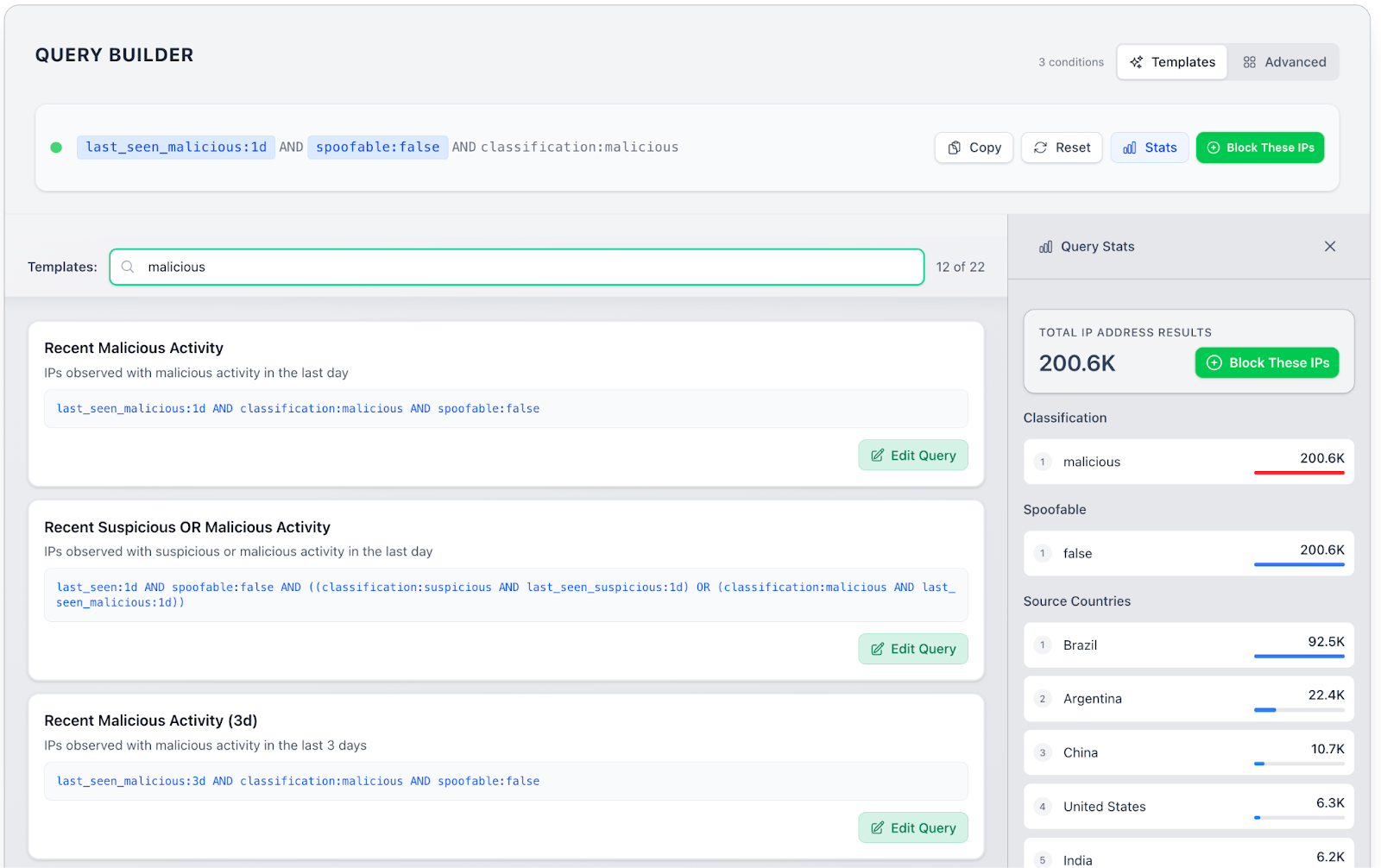
Creating blocklists within GreyNoise Block could not be easier. To optimize flexibility, each blocklist is associated with a GNQL query. For ease of use, GreyNoise includes a set of query templates that provide pre-built blocklists. Start by either selecting a pre-built template or writing a query from scratch.

When selecting a template, you can click “Block These IPs” to create a blocklist immediately or click “Edit Query” to refine the blocklist’s criteria even further. When editing the query, you can add, remove, or modify fields and group them logically through and/or clauses. As you modify fields, the Query Stats panel on the right updates automatically.

Once you have the query looking as you want it in the Query Builder, click the “Block These IPs” button to turn the query into a blocklist. 

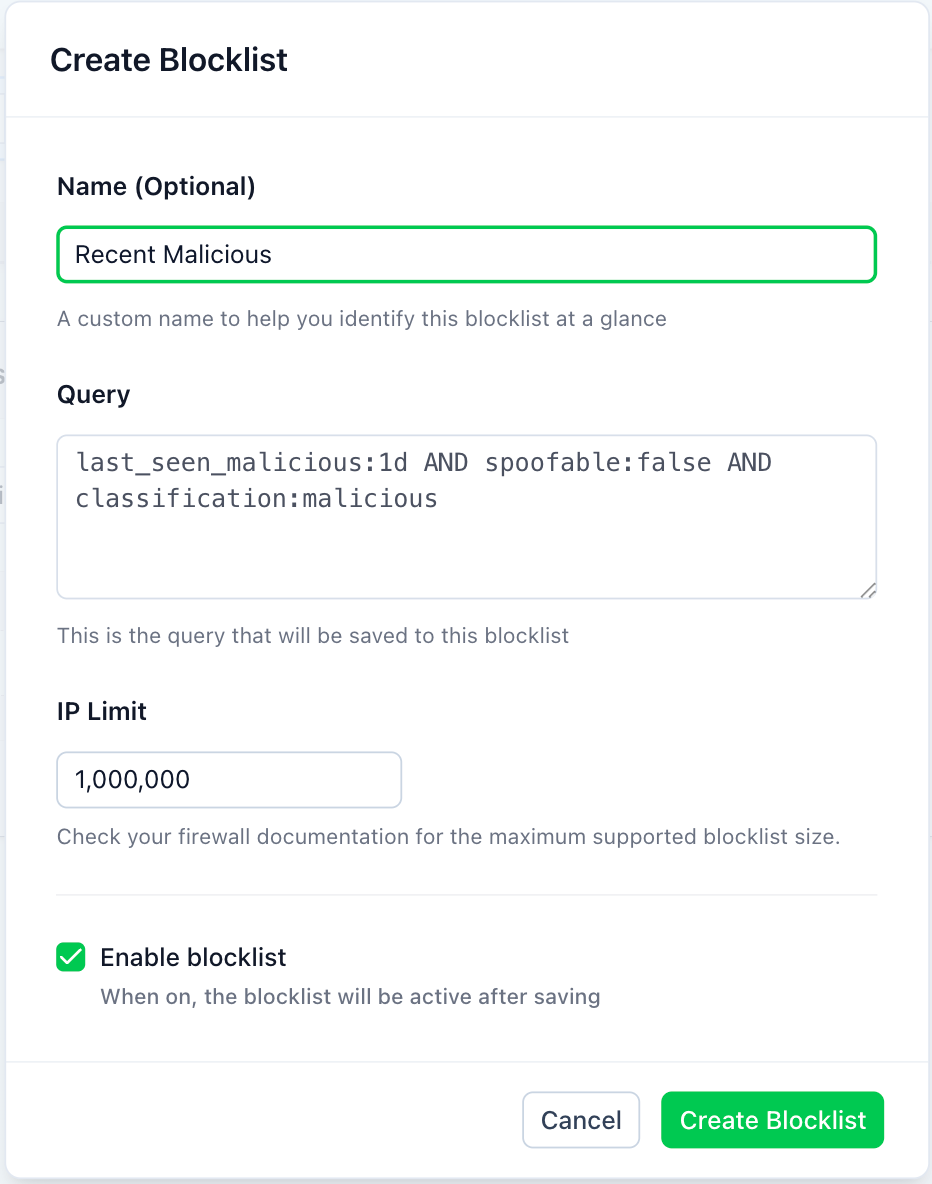
In the Create Blocklist dialog box, give the query a name and assign it an IP limit, which might be necessary if your firewall has a maximum supported size.

Once the block list is created, click the My Blocklists link at the top of the page to view the new block list and any others you have created. From the list, you can copy the blocklist URL to your firewall. 

That’s all there is to it. Your firewall will periodically poll the blocklist URL and keep that bad traffic out of your network.

Sign Up Now for a Free Trial

GreyNoise Block is available now with a free trial for 14 days.

Introducing GreyNoise Feeds: Real-Time Intel for Real-Time Response

Time is critical in incident response. The gap between exploit disclosure and patching, between compromise and containment, or between detection and recovery often determines the difference between a near miss and a major breach. Attackers automate everything from recon to exploit creation. Defenders need to close the speed gap.

Most threat intelligence workflows still rely on polling. Analysts or automated systems query APIs or dashboards on fixed schedules—every few minutes, every hour, sometimes even less frequently. By the time new data is pulled in, attackers may have already rotated infrastructure, moved laterally, or pivoted to a new exploit. This delay undermines automation investments, keeping defenders stuck in reaction mode.

Real-Time Feeds Instead of Polling

GreyNoise Feeds eliminate the need for polling by delivering event-driven webhook-based push notifications the moment something changes. Instead of waiting for the next scheduled query, your automation receives the update as soon as GreyNoise sees it. Teams can subscribe to three types of events:

  • CVE status changes: Get notified when a vulnerability moves into active exploitation (or back to inactive). Use these events to trigger automated patching, blocking, or monitoring workflows.
  • CVE activity spikes: Receive alerts when scanning or exploitation traffic against a CVE suddenly surges. These spikes often precede new disclosures, making them an early warning—even if your environment is already patched.
  • IP classification changes: Get immediate notice when an IP flips state, such as unknown to malicious. Because attackers gain and lose control of infrastructure quickly, reacting fast is the only way to block the right traffic at the right time.

Practical Use Cases

GreyNoise Feeds are designed to be wired directly into automation platforms like SIEMs and SOARs. With feeds in place, teams can:

  • Alert to Zero Day Risk. GreyNoise research has demonstrated that spikes of traffic against legacy CVEs often predicts the arrival of a zero day attack and new CVE disclosure. The Feeds event type CVE Activity spike provides organizations an early warning that provides organizations time to consider hardening, patching, and additional monitoring.
  • Proactive blocking. Use GreyNoise Feeds to directly update firewall blocking rules to stop reconnaissance and exploitation attempts against edge devices, often before damage occurs.
  • Vulnerability prioritization. Use GreyNoise Feeds to update vulnerability prioritizations as soon as GreyNoise observes new scanning and exploitation traffic. With the number of CVEs growing each year, many organizations face a backlog of vulnerabilities requiring remediation. While attackers have no means to exploit most CVEs, it’s critical to react once an exploitation is observed in active use.
  • Threat mitigation. When attackers target a vulnerability exposed on your network, it may be necessary to mitigate that attack while a remediation is implemented. GreyNoise Feeds can help automate that mitigation by providing immediate notifications of IP addresses engaged in malicious activities.


Easy Configuration

GreyNoise Feeds are quite easy to configure. Give the Feed a name, specify the type, that is whether IP classification change, CVE status change, or CVE activity spike, indicate the direction of the change (such as from unknown to malicious), and specify whether to notify on all IP addresses and CVEs or a select subset. 

You will also need to configure where GreyNoise should deliver the notifications, and each feed can have a unique delivery address. The address is a url that has been configured to receive webhook feeds. In order to support authentication and other features, GreyNoise Feeds supports adding custom HTTP headers.

GreyNoise Feeds take intelligence out of batch mode. Instead of asking what changed after the fact, your systems can respond the moment GreyNoise sees new exploitation, malicious activity, or infrastructure shifts. For defenders racing against automated attackers, that time advantage matters.

Learn more and watch videos on how to use at GreyNoise docs.

GreyNoise Intel Now Available Through MCP

While we may not know when the agentic SOC will arrive, we do know it will need timely and accurate intelligence to make good decisions. To provide that intel, we’re making the GreyNoise MCP Server available today, enabling easy integration of GreyNoise intel by Model Context Protocol (MCP) compatible AI agents. 

When an AI agent sees an IP address or CVE in a workflow, it can query GreyNoise in real time and learn:

  • Whether that IP is a benign mass scanner (safe to deprioritize),
  • A known hostile source actively exploiting CVEs (requires escalation), or
  • Completely absent from GreyNoise data (possibly targeted activity worth deeper investigation).

This grounding mitigates the risk of hallucinations and prevents agents from treating every alert equally, enabling more realistic, risk-based automation.

Practical Uses in the SOC

With GreyNoise data inside the reasoning loop, agents can handle several critical tasks more effectively:

  • Noise Reduction and Alert Triage
    GreyNoise filters out the background chatter of benign scanners and research infrastructure.
  • Exploitation Awareness and Vulnerability Prioritization
    When GreyNoise tags indicate active exploitation of a CVE, agents can prioritize remediation workflows accordingly.
  • Incident Response and Threat Hunting
    By pivoting on ASN, domain, and behavioral tags, agents can connect what appear to be isolated alerts to larger coordinated activity and trigger or suggest containment actions (e.g., pushing firewall blocks, updating IPS rules) in a way that minimizes false positives.
  • Continuous Monitoring and Risk Awareness
    Agents can watch GreyNoise observations in near real time, flagging when exploitation patterns overlap with an organization’s technology stack or internet-facing services.


Why GreyNoise Data Fits Agentic Workflows

SOC teams already use GreyNoise to separate background scanning from true threats. What changes with the MCP Server is that the same logic is now available directly to AI agents.

  • Real-Time Intel: Agents query GreyNoise live, ensuring their decisions reflect the latest activity rather than cached or stale data.
  • Behavioral Tags: Exploit attempts and reconnaissance behaviors are labeled, allowing agents to reason in higher-level terms than raw IPs and ports.
  • Analyst-Equivalent Context: GreyNoise fields—classification, CVE tags, first/last seen, ASN, sensor hit counts—mirror the attributes human analysts check when validating alerts.

This combination makes GreyNoise data especially well-suited to agentic SOC environments, where decisions need to be fast but also defensible.

Lighten the Work of Creating Intel Reports

Let’s say your manager wants an intelligence report, perhaps regarding an external threat, a set of IP addresses, or a vulnerability. For example, I may need to create a report based on a CVE, so I open Claude with the GreyNoise MCP server installed and enter the prompt:

Notice how Claude is making several calls to the GreyNoise MCP server as well as other sources so that it can combine these sources into a report.

Because of the GreyNoise MCP, the report includes details about IP address counts and recent surges in activity. Adding more to the prompt, such as “Tell me about the source geography of the attacks”, causes Claude to generate a much more detailed report. With minimal effort, you can write a prompt that creates just the report that you need. You can even ask for vendor risk reports and threat hunting plans. It’s a great way to reliably use AI to lighten your workload.

Final Thoughts

Agentic SOCs are still an emerging concept, but the risks can be mitigated and the value better realized if AI agents make decisions grounded in trustworthy data. The GreyNoise MCP Server provides a way to embed that grounding directly into agentic workflows.

For security teams, this doesn’t mean replacing analysts—it means giving agents access to the same noise-filtering and exploitation-awareness that practitioners already rely on, so that automation can act responsibly at scale.

Indeed, analysts can make great use of the MCP just by interacting with an LLM application that supports MCP, such as Claude. Conduct research. Look into trends. Generate reports. It’s as easy as it is fun.

Find everything you need to know in the GreyNoise MCP Server docs.

Faster Threats, Faster Defense: GreyNoise Launches Real-Time Threat Defense Capabilities at Black Hat 2025

In today’s threat landscape, speed isn’t optional — it’s existential. As attacks get faster, so too must your defense.

Attackers increasingly leverage automation, AI, and vast, ephemeral infrastructure to launch mass exploitation campaigns that scan, breach, and pivot within minutes — sometimes before a CVE is even publicly disclosed. Defenders, meanwhile, are often stuck pulling data manually, querying APIs, or waiting for threat feeds to update.

That’s the speed gap that attackers exploit. Today, we're launching a series of new capabilities to help defenders close that gap. These new capabilities help security teams leverage real-time threat intel to detect, block, and respond faster than ever before

The Speed Problem: Why Traditional Threat Intelligence Isn’t Fast Enough

The game has changed:

  • Automation is everywhere: Bots and AI-driven tools are running scans and exploitation campaigns at machine speed.
  • Exploitation is instant: Exploits are often deployed within minutes of discovery — or even before public disclosure.
  • Volume is relentless: Millions of IP addresses rotate constantly in mass scanning campaigns.

Yet many defenders still operate in batch mode: querying APIs, pulling feeds manually, or reacting only after the damage is done. GreyNoise is flipping that script. We’re giving defenders real-time, automation-ready intelligence — designed to meet the speed, volume, and precision required by modern security teams.

What’s New from GreyNoise

1. Real-Time Dynamic Blocklists

Stop mass exploitation at the edge — before it gets in.

GreyNoise-verified malicious IPs involved in opportunistic reconnaissance and exploitation are delivered in real time, designed to be integrated directly into your perimeter defenses.

  • Updated dynamically, second by second
  • Tuned for high confidence and low false positives
  • Compatible with firewalls, WAFs, and other edge devices
  • Subscribe once, get live protection — no manual updates required

Use it to:

  • Auto-block mass scanners and exploit attempts within seconds of detection
  • Proactively protect exposed assets before CVEs are weaponized
  • Harden your perimeter against “spray and pray” campaigns

2. GreyNoise Feeds

Threat intelligence that comes to you — automatically.

Say goodbye to the delays caused by polling APIs. Our new push-based data delivery means GreyNoise intelligence is streamed directly to your systems via webhooks — the moment we detect something new.

  • Real-time threat indicators, no polling delay
  • Zero lag between detection and delivery
  • Seamless integration into existing platforms and workflows

In security, minutes (even seconds) matter. Push-based intelligence closes the speed gap between attack and defense.

3. SOAR Integrations for Response Automation

From detection to action — with zero manual steps.

GreyNoise now integrates natively with leading SOAR platforms–such as Splunk SOAR, Palo Alto Networks XSOAR, IBM QRadar SOAR–to help teams turn intelligence into action, instantly and automatically.

Automate key workflows like:

  • Blocking malicious IPs without analyst intervention
  • Enriching IP data during incident investigations
  • Triggering alerts or playbooks when mass exploitation campaigns are detected

The result:

  • Faster containment
  • Consistent, repeatable response
  • More time for your analysts to focus on what matters

Why This Matters

These launches are part of GreyNoise’s commitment to empowering defenders with:

  • Speed: Intelligence and action in real time — because modern threats don’t wait.
  • Automation: Automate your security with reliable, real-time intelligence and reduced risk of false positives.
  • Integration: Delivered where you already work — firewalls, SOARs, SIEMs, and more.
  • Noise Reduction: High-confidence signals only — no alert fatigue, no chasing ghosts

Who It’s For

These new capabilities are built for:

  • Security operations teams seeking to automate blocking rules in near real time with reliable and actionable intelligence about IP addresses exploiting exposed vulnerabilities. Real-Time Dynamic Blocklists and SOAR integrations enable this automation use case.

  • Incident responders who need to quickly understand the extent of an incident by narrowing in on the malicious network traffic that have exploited a vulnerability. Realtime updates through Feeds and SOAR integrations enable rapid responses.

  • Threat intel teams looking for real-time context on emerging discovery and exploitation attempts tied to high priority risks as well as intel that enables immediate investigations to discover damages caused before vulnerability disclosures. Subscribing to web hook feeds ensures that intel teams stay updated in real time.

Modern Attacks Move Fast. Your Defense Should Too.

GreyNoise is building the future of threat intelligence for defenders who don’t have time to wait. 

Meet with us at Black Hat 2025 to learn more — or get started today.

The Tortilla Test: Ensuring Your Vulnerability Intelligence is Always Fresh

All of my friends (and my bathroom scale, honestly) will tell you that I love tortillas.  Not just any tortillas, however…they have to be homemade.  I make sure we have homemade tortillas every week and keep them in the fridge.  They are better than anything you can buy in a store, and they are simply amazing when they are hot off the comal.  My kids know this; when they see the comal on the stove, they make a point of hanging around the kitchen to snag one (often a few!) while they are fresh because they understand that freshness is everything for tortillas.

It turns out the same is true for vulnerability intelligence!

In just the first 6 months of 2024, we’ve seen over 2,000 remotely exploitable, no-authentication-necessary CVEs be published.  These are the kinds of vulnerabilities that are exploited on the Internet - via APTs and criminals or botnets driving mass exploitation - every minute of every day.  This is a huge amount to deal with, and what we’ve seen this year is that they are occurring more frequently on edge devices that don’t have many mitigating controls to protect them.  When these things happen, it forces security teams to drop what they are doing and scramble for a fix.

There are many existing vulnerability prioritization solutions that can help by including information like “Known Exploits Available” or “In the Wild”. The issue is that these attributes quickly become stale.  Technically, a snippet of proof-of-concept code is an available exploit, but it isn’t the same as a mass exploitation attack by a criminal organization.  A hard-to-exploit race condition that requires a lot of time and effort might be “In the Wild”, but that doesn’t require the same urgency to fix as something an actor is actively exploiting today.  In many ways, these attributes (in addition to CVSS Base Scores, Vendor bulletins, etc) are like stale tortillas - edible but ultimately unsatisfying.

At GreyNoise we believe that security teams deserve actionable information that is fresh enough to know what attackers are doing right now, so that they can respond with the speed and urgency required.  Consequently, today we’re launching GreyNoise for Vulnerability Prioritization to give our customers exactly that.

Here’s how it works:

We run a global network of thousands of sensors that emulate the types of assets enterprises have exposed to the Internet:  web servers, network gear, etc.  We see when attackers and bots start probing them, and we collect the data as they are attacked in real-time.  We compare this against known bad behaviors and known IPs; our ML models are even capable of alerting us to unknown but suspicious or malicious activities that are the hallmarks of novel exploits. This is all unique, primary data that we collect rather than simply aggregating from third-party sources.  In other words, we make fresh tortillas from scratch rather than just reselling ones we bought from a supermarket.

As we collect this information, we make it immediately available via our Visualizer for ad-hoc usage and through our API for inclusion in your existing automation.  We ensure that information is always fresh, so that you can get the most up-to-date intel for as long as you need until you fix the problem.

There are many good vulnerability prioritization tools out there, but we believe that only we can tell vulnerability teams which CVEs need attention now based on what attacks are actually happening today.  Because Vuln Intel is based on all the same data that powers GreyNoise, you’ll also be able to share what you know seamlessly with your SOC analysts and threat hunters.

We think you’ll enjoy having fresh and actionable information with Greynoise Vulnerability Prioritization.  You can visit our website to learn more or schedule time to talk with us directly. 

I know you’ll also love having fresh and delicious tortillas, so please enjoy this recipe.  I look forward to hearing from you about both!

Flour Tortillas Recipe

Ingredients:

  • 4 parts all-purpose flour 
  • .1 part salt
  • 1 parts lard (or shortening, but lard is the best)
  • 2 parts water - hot water for thin and chewy tortillas, cold water for thick and fluffy

For example, I find 300gm (4 x 75gm)  flour + 75gm lard (1 x 75gm) + 8gm salt (.1 x 75gm) mixed with 150gm (2 x 75gm) hot water makes 8 burrito-sized or 12 fajita-sized tortillas.

Instructions:

  • Place flour, salt, and lard in a bowl.  Add in water; if using hot water, give it 30 seconds to melt the lard.
  • Knead for 1 minute - it should be tacky but not so sticky it won't easily come off your fingers; you can add a little flour if needed.
  • Let stand covered for 30 minutes.
  • Heat a cast iron griddle (a skillet works too) on med-high for 5 minutes (i.e. at the 25-minute mark)
  • Divide the dough into golf ball-sized portions.
  • Using a rolling pin, roll one into 6-9 inch diameter rounds.
  • Cook 30 seconds on one side - you'll see bubbles form on the top when it is time to flip.  Now is a great time to roll the next round while it cooks.
  • Flip and cook for another 15-30 seconds; I like longer to get a few charred spots.
  • Stack on a plate and cover with a towel.

Eat them soon — they will be unbelievably good for 60 minutes, very good the rest of the day, and better than anything you can buy in the store for at least a week if you keep them in the fridge. 

Exploring GreyNoise: The User-Centric Design Approach in Cybersecurity

In today’s cyber landscape, blending robust security with effective design is not just beneficial—it’s essential. At GreyNoise, we integrate design principles from the very beginning of our development process, ensuring that every security measure is user-focused and seamlessly integrated. This approach doesn't just enhance the security of digital services; it also ensures that updates and innovative controls fit perfectly within existing systems.

Empowering Users with User-Centric Design

Our philosophy at GreyNoise centers around understanding and addressing your needs, challenges, and feedback. By prioritizing user-centric design, we ensure that each feature and update is not just powerful, but also relatable and engaging.

Putting You First: Your needs, challenges, and feedback are what drive us at GreyNoise. We believe that understanding your perspective is key to making our cybersecurity solutions not just powerful, but also relatable and engaging.

Anticipating Security Needs: We proactively incorporate mechanisms like security logging, monitoring, alerting, and response capabilities into our systems, preparing for potential security incidents before they occur [1].

Join Our Community on Slack: Your insights are invaluable. Engage with us on Slack to share your experiences and suggestions, playing a pivotal role in our product iteration process. Join our Community on Slack.

Simplicity and Accessibility: The Hallmarks of GreyNoise Design

Our commitment to simplicity and accessibility ensures that our tools are straightforward and can be used by everyone. Here’s how we achieve this:

Clutter-Free Interface: Simplicity is central to GreyNoise’s design ethos. Our interfaces are streamlined, focusing on delivering essential information efficiently to prevent overload and facilitate quick, informed decisions.

Focused Feature Set: We hone in on the most impactful features, ensuring our tools are straightforward and effective, making complex threat analysis accessible to all users.

Inclusive Design Philosophy: Upholding the principle that cybersecurity should be accessible to everyone, GreyNoise designs tools that cater to a wide range of abilities, embodying our inclusive design philosophy. Our proof of promise and commitment to accessibility is demonstrated through our Voluntary Product Accessibility Template (VPAT), which details how our products adhere to recognized accessibility standards. This transparency underscores our belief in making security tools accessible to everyone, affirming that effective security is a universal right.

Visual Engagement: Simplifying Complex Information

GreyNoise uses visual elements like infographics to break down complex information, making cybersecurity concepts more understandable and engaging, illustrating the practical benefits of our design-driven approach.

View: https://viz.greynoise.io/tags/palo-alto-pan-os-cve-2024-3400-rce-attempt?days=10

Real-World Applications and User Experiences

GreyNoise consistently demonstrates its commitment to enhancing user capabilities through various educational and interactive platforms. We offer comprehensive demos and case studies, which are pivotal for users looking to deepen their understanding of cybersecurity practices [2]. These resources are tailored to help both novice and advanced users by providing practical, real-world applications of GreyNoise's cybersecurity solutions.

Additionally, GreyNoise is proactive in addressing future cybersecurity concerns by hosting webinars, such as the recent discussion on the future of honeypots. These events aim to educate participants on strategies to combat targeted attacks, reflecting GreyNoise's dedication to keeping the cybersecurity community informed and prepared [3].

A Fusion of Cybersecurity and Design

At GreyNoise, we are redefining the synergy between security and design. Our dedication to user-centric, simple, and accessible design propels us to deliver tools that are not just powerful but also intuitive and inclusive. With GreyNoise, you are equipped with cybersecurity tools designed for the modern digital landscape, where effective security seamlessly integrates with exceptional user experience.

Key Innovations and Features

1. Explore and Investigate: Users can delve into detailed analyses of IP activities, enhancing their understanding and ability to react swiftly to potential threats [4].

2. IP Timeline and Details: Offers a comprehensive view of an IP's history and current status, allowing users to track and analyze behavior patterns over time [5].

3. Alerts and Blocklists: Enables proactive responses with customized alerting systems, ensuring users can respond to threats promptly [6].

At GreyNoise, we don’t just create tools; we build solutions that integrate effective security with exceptional user experience. Our commitment to user-centric, simple, and accessible design drives us to deliver products that not only protect but also empower our users.

Explore GreyNoise’s Design-Centric Cybersecurity Solutions

Dive deeper into how our design-centric cybersecurity solutions can transform your security strategy. Interact with our tools, join our community forum on Slack to share your insights and help shape the future of cybersecurity.

FAQs: 

How does GreyNoise ensure its design is user-centric?

GreyNoise integrates user feedback throughout the design and development process, ensuring that our tools meet real user needs effectively and intuitively.

What are GreyNoise’s key design principles?

We focus on simplicity, user-centricity, and accessibility to ensure our cybersecurity tools are effective and easy to use for everyone.

How can I provide feedback on GreyNoise products?

Join our Slack community! It’s a vibrant space where you can provide direct feedback, suggest improvements, and influence our product development.

Reference: 

  1. Secure by Design Principles
  2. GreyNoise Blog
  3. GreyNoise Resources
  4. GreyNoise Product Overview
  5. IP Timeline Feature
  6. Alerts and Blocklists

GreyNoise Tags Its Way to 1337 Elite Status

Yesterday, GreyNoise reached a fun and significant milestone after publishing our 1,337th tag. 1337 is a cherished number in hacker culture, as it is a numerical shorthand for "leet", which itself stands for "elite". This term has deep roots, going all the way back to the 80's when one had to make modems scream to access bulletin board systems (now, we humans are the ones screaming whenever we go online to see what fresh hades awaits us each day).

What makes this milestone even more significant is how it was achieved.

The chart, below, shows the cumulative sum of tag counts by year. While there was a modest improvement in intra-year tag creation from 2022 to 2023, we're just into the first few weeks of Q2 in 2024 and are almost at the total tag count for 2023.

We will almost certainly blow past 2023's tag count well-before the end of Q2, and this has all been made possible by our focused and practical use of AI. This system helps our incredible detection engineers quickly triage the millions of events our sensor fleet absorbs every day. With it, they discover and tag novel payloads to help inform and protect our customers, community, and the internet as a whole. The application that fuels this work is called Sift, and we've waxed poetic about it quite a bit over the past few months.

This boost to the tag inventory has also meant an increase in CVE coverage.

(Since it most likely drew your attention, the jumps in 2022 were due numerous factors, including the increase in Russian hostilities towards Ukraine.)

60% of 2024 tags are based on CVEs, and — along with plenty of "modern" vulnerabilities — Sift has helped us catch exploitation attempts of some very old CVEs, too:

I'm incredibly proud of our team of data scientists, security researchers, and detection engineers. Their leet expertise powers the detections that folks rely on every day, and we hope you'll join in our celebration of achieving this epic milestone!

To learn more about GreyNoise tags and how they differ from "traditional" detections, check out our Tags Webinar Series.

Leveraging AI Advances to Improve Intelligence for Discovery, Identification, and Interpretation

AI is so hot right now, and the cybersecurity space is no exception. Technology leaders are unveiling exciting new capabilities, vendors are making extravagant claims, and practitioners are working hard to understand how to separate the wheat from the chaff, leveraging AI where it can make the most difference to their operations’ and their organization’s risk.

Here at GreyNoise, we’ve been investigating where AI capabilities can have the biggest impact, and then working to deploy them internally, externally, and in partnership with other security vendors. In this blog we’ll discuss several GreyNoise AI projects and how they’re helping defenders identify and understand threats and secure their environment.

Sift: AI for Anomaly Discovery

Traditional automation is rule-based and rigid. “IF a packet matches this malware signature, THEN block it AND generate an alert”, etc. AI-based approaches are different. AI makes it possible to automate pattern recognition—and its inverse, anomaly discovery. With AI, defenders can rapidly process high volumes of data, and automatically identify the most suspicious observations for high-priority analysis and triage.

Sift is GreyNoise’s tool for solving this problem. It leverages multiple advanced AI techniques, including: 

  • custom-built LLMs (Large Language Models) 
  • nearest neighbor search and vector databases 
  • unsupervised clustering

Sift runs daily, helping our research team process the data generated by our global sensor fleet to identify novel behavior, traffic, and attacks.

For more on Sift and how it works, check out our technical launch blog here

Sift: AI for Targeted Attack Identification

But Sift doesn’t stop there. The same techniques can be applied to the data generated by targeted subsets of our sensors, helping specific organizations generate intelligence insights and reports tailored to observations from their own networks. This AI application will bring the industry-leading research capabilities of GreyNoise into any organization’s internal security processes, reducing triage overhead, accelerating attack identification, and making life easier for defenders—and harder for attackers.

For more on how to bring the insights of Sift into your own organization, talk to our team.

Copilot: AI for Interpretation

The capabilities of AI aren’t limited to stochastic data analysis. Recent advances in transformer architectures and LLMs have cracked the natural language barrier, making it possible to generate well-formulated utterances at scale. This has opened up a new frontier of AI assistants. Microsoft Copilot for Security is leading the charge to bring these capabilities into the cybersecurity space, and GreyNoise is working together with Microsoft on this initiative. We’re a partner in the Microsoft Copilot for Security Partner Private Preview, and our plug-in means that both free and enterprise users can access GreyNoise insights from within their Copilot interface with natural language prompts.

For more on how GreyNoise and Microsoft Copilot for Security work together, check out our dedicated integration page.  

The Future of AI

The future of AI is hard to predict, and the evolution of the field has famously surprised both boosters and skeptics. Organizations looking to leverage these rapidly transforming capabilities will need to roll with the punches—and continue to partner with security vendors who can do the same. Here at GreyNoise we’re committed to doing just that. We’re excited to share how AI is already empowering our security—and we can’t wait to see what’s next.

Battling Ransomware One Tag At A Time

In October 2023 — as part of the Ransomware Vulnerability Warning Pilot (RVWP) — CISA began tagging entries in their Known Exploited Vulnerabilities (KEV) catalog. This field designates whether exploits for a given vulnerability are known to be used in ransomware attacks. Ransomware has disrupted critical services, businesses, and communities worldwide, and many organizations are working diligently to get ahead of these attacks to prevent losses, disruptions, and exposures.

We’ve talked about this topic before, but today we dig a bit deeper into the topic with some specific guidance as to how your organization can fight the good fight against these foes by leveraging the power of GreyNoise tags.

GreyNoise Tags vs. Ransomware

As scores of organizations who use them know, GreyNoise tags are a signature-based detection method that categorizes internet noise into actionable intelligence. As of this writing, we’ve observed recent activity in 63 tags that CISA has identified as being used in association with ransomware attacks. The figure at the beginning of this post shows the frequency and volume of this opportunistic activity. One striking feature of this activity is the diversity of targeted platforms.

In the case of internet-facing attack campaigns, one might assume that vulnerabilities targeted by ransomware actors would lean towards remote access technologies. The chart and our data that backs it up shows that almost no technology category is safe from these types of attacks. Collaboration tools, such as Atlassian Confluence or JetBrains TeamCity; email platforms, such as Microsoft Exchange; software that powers application middleware services, such as Jboss and WebLogic; or, even devices that are intended to help elevate safety and resilience, such as SonicWall, Ivanti, Citrix, and Fortinet are all regularly targeted.

If you use any of these technologies, knowing when new activity is seen can be helpful in shoring up defenses and readying response activities. By leveraging GreyNoise platform features, such as our Alerts and block lists, security teams can, respectively, determine if more focus should be placed on monitoring key systems and preventing opportunistic harm. With the noise weeded out, response teams can focus their attention on similar activity that is likely to be more targeted, which may also mean by more capable adversaries. And, because we play incredibly well with a host of other security tools, teams can also save time, and use our intelligence within familiar environments.

The Long, Sporadic Tail Of Ransomware Tag Activity

Another striking feature of our ransomware tag activity chart is the diversity of activity. Cloud deployments top the list, with attackers looking to take advantage of misconfigurations that may arise in these highly dynamic environments. Broad and commonly deployed technologies are also regular targets, since these systems can also become victims of errant misconfigurations, especially when restored from unpatched backups.

However, as we move down the list, the frequency becomes far more sporadic, and many involve only single hosts vs. botnet armies. This can be due to attacker familiarity, or individual actors keying off results from well-timed Censys or Shodan searches that show newly exposed vulnerable configurations. If your organization uses any of these components, there truly is no rest from vigilance.

The Ransomware GNQL Listicle

To help defenders get a leg up on these attacks, the list below has links to each individual tag that’s known to be used in ransomware attacks. At each tag page, you can find the block list URL which you can use to immediately weed out the opportunistic noise. Wrap one or more of them inside a GNQL query, such as tags:"F5 BIG-IP iControl RCE Attempt", and you can set up an alert to notify you when new activity is seen, especially in generally dormant tags.

Find Out More

If you're curious as to just how GreyNoise researchers craft our tags we have a three-part webinar series that discusses the makeup of our tags, walks you through how we discover what needs to be tagged, and illustrates how AI is empowering the creation of new tags and detections:

Not a GreyNoise customer — yet? See how much time GreyNoise may be able to save your organization, and how many hours your defenders can save with our ROI calculator.

Sign up and take our platform for a free enterprise trial to see all the features and data available.

Elevating Threat Intelligence with GreyNoise and Microsoft Sentinel

GreyNoise has recently released a new integration for Microsoft Sentinel, enhancing the capabilities of threat intelligence for business security. This integration provides security professionals with valuable insights into internet-wide scanning and reconnaissance activities. Tailored to offer a streamlined feed of threat indicators, it enables proactive threat identification and mitigation. Users can now leverage GreyNoise data within their threat-hunting queries and any analytics rules.

GreyNoise indicators in Microsoft Sentinel

One of the most exciting aspects of our new integration is the seamless combination of GreyNoise’s data with Sentinel’s threat-hunting capabilities. Analysts now have a unique, robust ability to utilize GreyNoise data when investigating potential malicious patterns and anomalies within their network events. The integration also allows filtering out known opportunistic traffic during threat hunting to identify more targeted and malicious activity better. 

Modified threat-hunting queries to filter out indicators from GreyNoise

To further enhance detection capabilities, the new content pack also introduces a set of analytics rules designed to identify and mitigate potential threats. By incorporating these indicators into analytics rules, security teams can take a more proactive approach to identifying known malicious behavior. By taking this approach, detections are elevated, and organizations can stay ahead of malicious actors that are commonly looking for exposed, vulnerable devices and misconfigured applications. 

In conclusion, integrating GreyNoise with Microsoft Sentinel offers a strategic advantage in navigating the cybersecurity landscape. By combining indicators from GreyNoise with analytics rules, hunting queries, and existing automation workflows, analysts now wield an indispensable toolkit to combat evolving threats proactively.

Explore the latest content pack available on the Azure marketplace to start ingesting GreyNoise indicators into Microsoft’s Sentinel’s threat intelligence platform. You' will need a current GreyNoise trial or Enterprise license to access the GNQL API endpoint for data ingestion.  If you do not have access to either, contact us for more information and to get started.

Getting A Leg Up On Initial Access Ransomware With CISA KEV and GreyNoise Tags

The Cybersecurity and Infrastructure Security Agency (CISA) has added a field to their Known Exploited Vulnerabilities (KEV) catalog that denotes if a KEV CVE has been used in ransomware attacks. Over two hundred KEV CVEs fall into this category, 75 of which (~35%) have corresponding GreyNoise tags. GreyNoise's planetary fleet of sensors are designed to catch remote Initial Access attacks, and most ransomware exploits in KEV fall outside this category.

The addition of this ransomware designation has proven to be valuable for defenders. It provides a critical data point that may help them gain traction for interrupting normal operations so that teams can focus on patching and applying mitigations to prevent a potentially devastating incident from occurring.

As the chart below shows, GreyNoise meets or beats KEV when it comes to having detections and actionable intelligence available after a CVE has been published. Since many ransomware gangs hide their activities in the same compromised devices that GreyNoise tracks daily, this gives organizations that use GreyNoise IP intelligence block lists a significant advantage over those that do not. You can effectively negate the onslaught of the majority of opportunistic ransomware attacks and campaigns of initial access brokers by using the hourly updated telemetry provided by the GreyNoise platform.

Extending Your Lead

To stay even further ahead of our combined adversaries, GreyNoise account holders can join in the fight by sifting through the novel daily clusters of malicious events that assault our fleet every minute of each day.

We’ve talked about Sift before, and the GreyNoise Labs and Design teams recently enhanced the user experience, streamlining the user interface and integrating more tools to make it easier to spot potentially new and malicious traffic.

Know. More. Noise

Not a GreyNoise customer — yet? See how much time GreyNoise may be able to save your organization, and how many hours your defenders can save with our ROI calculator.

Sign up and take our platform for a free enterprise trial to see all the features and data available.

GreyNoise Round-Up: Product Updates - June And July 2023

As we roll through the summer, GreyNoise is back from its July two-week shutdown with a bunch of fresh new improvements, including 63 new tags and a bunch of exciting new data insights for our customers to explore in our Labs API.  We’ve also updated our integrations to add support for our IP Similarity and Timeline for our Palo Alto customers.

New: Explore C2 Data, HTTP activity, and more

topC2s

Access the top 10% of possible Command and Control (C2) IP addresses, ranked by their pervasiveness, observed by GreyNoise over the previous 24 hours. Use this query to identify second-stage IP addresses that might be involved in malicious activities following the reconnaissance and initial access stages. 

topHTTPRequests

Access the top 1% of HTTP requests, ranked by their pervasiveness, observed by GreyNoise over the last seven days. Gain insights into the background radiation of the internet, exploring the patterns and trends of HTTP requests.   

topPopularIPs

Access the top 1% of IPs searched in GreyNoise, ordered by the number of users observed searching over the last 7 days. Understand commonalities in how users search within GreyNoise, gaining insights into popular IPs and their associated activities. This query uses a minimum number of IP submissions and users to build consensus before an IP can be considered available in this dataset.

noiseRank

Access the top 1% of IPs by their noise score for the last 7 days. This score is determined by comparing the pervasiveness of the number of sensors and countries that observed packets from the IP, the request rate, and the diversity of payloads and ports for which the packets were observed.  This query is intended to help rank the top noise makers compared to the quiet single-hit scanners. 

Enhancement: Create an Alert for a Tag From the Tags Action Panel

We’ve added a “Create Alert” button in the Action panel on the Tag details page to make it easy to create an alert. GreyNoise users can use this to monitor scanning activity directly from the Tags page, informing them of any new IPs scanning for tags they are interested in.

Enhancement: Copy/Search Fields On IP Details

There is now a Copy/Search button in fields on the IP details page. The previous behavior did not allow users to copy the values in the fields.

You can access the Copy/Search buttons by hovering over fields such as Ports Scanned, Country, OS in the IP Details pages.

Enhancement: Analysis File Size Increased to 4MB

Previously, the Analysis Feature only accepted inputs up to 2MB.  We've increased this to 4MB, so that customers can submit larger files without getting an error. 

New and Updated Integrations

Palo Alto XSOAR (Demisto) Improvements: IP Similarity and IP Timeline Support

We updated our Palo Alto XSOAR support to include our IP Similarity and IP Timeline features, allowing users to easily find similar IP addresses, or review GreyNoise’s classification history on an IP.

To learn more about using the XSOAR Demisto enhancements for IP Similarity and Timeline, you can check out our documentation.

Tags Coverage Enhancements

In June & July, GreyNoise added 63 new tags:

56 malicious activity tags

2 benign actor tags

5 unknown tags

All GreyNoise users can monitor scanning activity we’ve seen for a tag by creating an alert informing them of any new IPs scanning for tags they are interested in.

Notable Security Research and Detection Engineering Blogs:

Don't have a GreyNoise account? Sign-up for free.

How to Leverage GreyNoise in Your SOAR Playbooks

During our latest webinar Proactive Defense Made Easy: Leveraging GreyNoise in Your SOAR Playbooks, we discussed some everyday use cases using GreyNoise with other SOAR platforms. The main goal of using GreyNoise with other SOAR platforms is to quickly identify either opportunistic attacks, get better insight into how infrastructure is being used, as well as enriching alerts using RIOT data to IP's associated with common business services.

Using GreyNoise to identify opportunistic scanning provides context to decisions in a SOAR playbook to either decide to investigate further or more quickly move to block IP's. Adding the checks into an investigation playbook provides data on scan activity and any vulnerabilities observed as being exploited.

A Tines story that uses GreyNoise as the first step to decide additional investigations needed.

RIOT data also provides quick data for an investigation. Many services integrated into an investigation playbook will provide details for when something is malicious but often don't provide details on known or known good services. Everyone wants the confidence to take action with their automation but may not have the insight needed. Additionally, no one wants to be wrong about this decision. RIOT adds this information to a playbook to assist with decision-making.

Phishing email in XSOAR identifying office 365 emails using RIOT data.

GreyNoise can be used in common SOAR use cases to provide better context to phishing playbooks and investigations and have more confidence to block IP's. The power of GreyNoise, alongside other intelligence tools like Recorded Future, VirusTotal, Tines, and Splunk, is nothing short of astonishing(see our full list of integrations). I hope the insights shared during the webinar inspired you to explore these tools further and optimize your cybersecurity investigations. Sign in/up for GreyNoise to explore our data for free.

Watch the full webinar

No blog articles found

Please update your search term or select a different category and try again.

Get started today